Sharing in case someones wanna try it. Worked like a charm for me. Instead of buying the RTC balls from titleist just put one or two dots of aluminum or metal tape on the ball you actually play with. The results were great for me so im sure it will help others. Cheers.
-
-
I used the dots I have from my mevo and didn't notice any difference in the garmin app. I guess I should try again and spend more time experimenting. Now the elevation being cranked up did yield some better #'s ,Thanx ! -
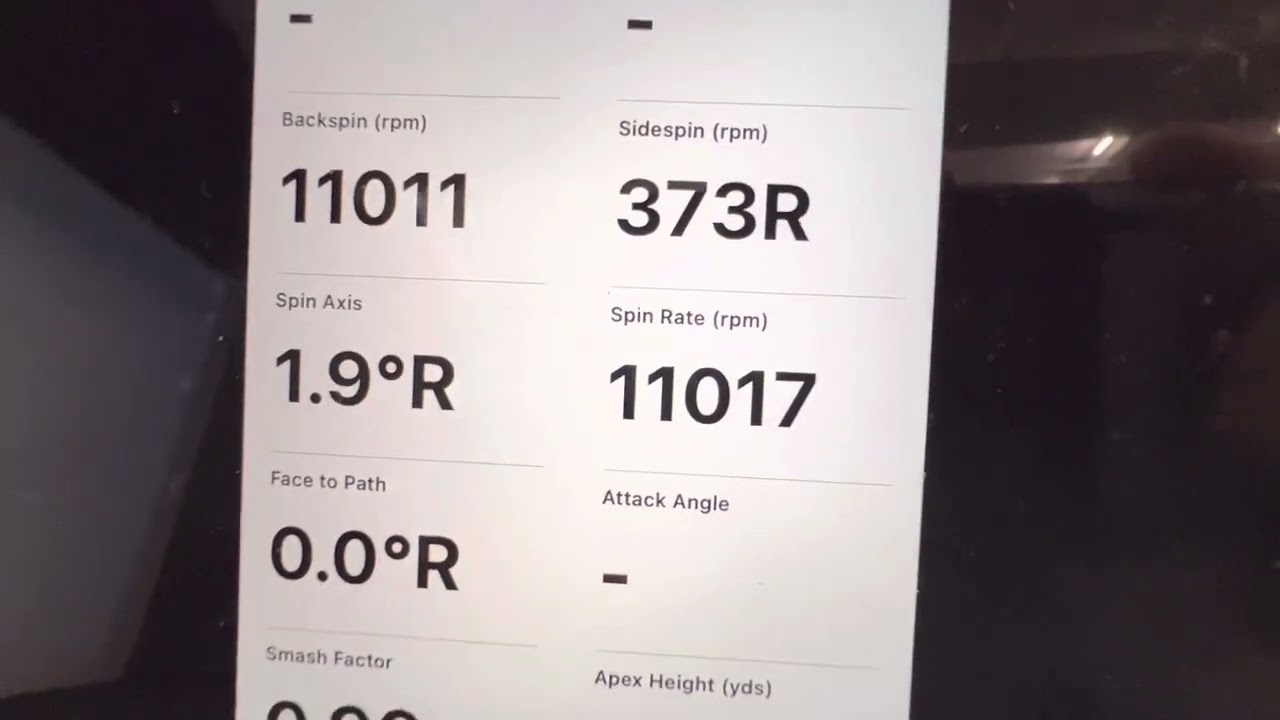
See screenshot below for my spin rates. Top ones without the dot and bottom with dot. Cheers
Comment
-
I second this. Using my garmin I was getting 6500 backspin with my 58 degree wedge. Put the aluminum foil tape on and now 10,000 backspin consistently. Totally changed my way I hit balls into the green with TGC2019. I can actually back balls up on the green now, instead of playing for the runout.
Also, from a youtube video about the same thing. In the garmin app, on the detailed numbers screen, anything that is italicized, that value is calculated. Anything that is normal font, that number is measured. When I don't have aluminum tape on the ball, the font is italicized. When I put aluminum tape on the ball, the font is normal.Comment
-
Wow Dizzle71 - that is very promising, what are your green settings (soft, hard, etc)?Totally changed my way I hit balls into the green with TGC2019. I can actually back balls up on the green now, instead of playing for the runout.
Can you take some snapshots/pics of the balls with the tape on them? Are you putting a strip, or just one spot/square like Erik mentioned?
Dizzle71 - and erikfig - what kind of damage does that do to the screen with the aluminum tape on the ball?Comment
-
My TGC are the following. I just try to keep them the same for every course.
- Green Firmness - Soft
- Green Speed - Slow
- Terrain Firmness - Moderate
I've tried both sizes of tape. I've tried the strip that is 1/4 inch wide and goes across half the ball, as well as a small piece like Erik mentioned. Both seem to work well, although I think the strip causes some weird side spin issues. I'm still testing different ways to add the aluminum tape. Overall all the tape does make a difference for me.
As for the screen, the aluminum tape I bought is so thin, it goes right down in the dimples. I don't think it has any effect on the screen. I think the ball does more damage. (That's my initial thoughts on that subject to change).
On a side note in regards to the skytrak and garmin. When using the skytrak and using their software for the range, I get believable numbers. I trust the skytrak range. But when I hook the skytrak up to TGC2019, it doesn't seem to pass the same numbers correctly. On the other hand, the garmin R10 seems to pass the correct numbers to TGC2019.Comment
-
Dizzle71 - that's amazing. Have you tested Titleist RCT balls and see if you get the same results? I'm going out right now and will test mine with a 60% wedge. See what kind of spin numbers I get. stay-tuned...
As far as screen getting torn up by balls as much as tape. That's probably the case. I have quite a bit of ball burn, but I place a Photo Backdrop in front of my impact screen and it get's the ball-burn, instead of my screen. Are you seeing ball burn on your impact screen? I've heard some screens will have it, others not.
Comment
-
Dizzle71 - I just came in from hitting tons of Lob Wedges 60 degree with the TItleist ProV1 RCT balls.
You say:
I could not get anywhere close to 10,000 backspin with the RCT balls. The highest backspin I could get was 8,800, and most were in the 6,800-7,200 range. I tried everything even hitting flop shots, didn't work, if I hit longer shots the spin increased, but never to the 10,000 backspin... what type of hitting mat are you using? I just thought of that?I was getting 6500 backspin with my 58 degree wedge. Put the aluminum foil tape on and now 10,000 backspin consistently. Totally changed my way I hit balls into the green with TGC2019. I can actually back balls up on the green now, instead of playing for the runout.
Mine is coming off a FiberBuilt hitting mat, and I wonder if you could try the Titleist RCT balls off your hitting mat to see if you can match what the tape does? I bought a sleeve of 3 of RCT balls for around $25.00 I think. It would be an interesting test.
Thanks,
-BrettComment
-
I've been trying the dot cut from aluminum HVAC tape. Very thin and holds to the ball very well. I use it for the drivers wood an hybrids. I have to try the hard wedges and see. I had some odd -out of the blue - ball flights with dot on wedges, but I'll try again.
Courses Created:
Cresent Hill KY (L)
Cherokee Park KY (L) 9
Seneca GC KY (L) 18
Charlie Vettiner KY (L)Comment
-
Thanks Chuck - let us know what kind of backspin you can get out of your wedges? Also, what type of hitting mat your using. I'm wondering now if the Fiberbuilt mat reduces my backspin - it's certainly not allowing me to pinch the ball like I do on turf, that could be it.
-
-
Not sure if you are doing this when putting on the metallic dot, but the best way to make sure it is on proper and as smooth as possible with the ball is to apply the dot and then tee the ball up with the dot facing where you believe your driver will make contact with it and give it a good hit with your driver.
in terms of placing two dots on the ball, TrackMan used to recommend (TM3 and older units) placing the two dots side by side in a figure 8 type position. Then placing the ball so that the dots are perpendicular to your radar.Comment
-
Well Dax, I have a lot of aluminum tape and a sharp pair of scissors. I'll try that and see. Anyway, just my backspin tests, I didn't notice much diff and I was doing a lot of flop shots. I'll try some more. But typically I saw high 3000s, and 4000-7000 spins. Rarely anything above 8000. But that was just one dot and it was facing away from the radar. BTW, if I compared my ES16 with it, they would usually be ballpark same, but I did say "usually". Spin Axis was typically where they diverged.Last edited by Chuck; 02-04-2023, 01:02 AM.
-
-
Hey Dizzle71 - I'm curious how you're getting 10,000 backspin on those wedges.... All things being equal - I wonder now what your distances are: R10=>BALL and BALL=>SCREEN? Mine are very short - 6' R10=>BALL and 8'6" BALL=>SCREEN.
Like to hear where your at - that's one of the things that I feel could be affecting it - also , whoops - Garmin just updated the Garmin Golf App, have to give that a spin this weekend...
Thanks,
-BrettComment
-
Hey Brettster. Sorry been out of town for work for awhile. Last night I did some measurements and created a video. Here is my setup.
Screen --> Ball 9'4"
R10 --> Ball 6'0"
In the video, we take 4 swings with a standard Maxfli Tour golf ball with no tape. You'll see the backspin italicized. Then we take a different ball, (same model) with a small piece of aluminum tape on it and you can see the backspin numbers jump and they are non-italicized. (measured by garmin). Hope this helps.Comment
-
Thank you Dizzle71 - that's impressive... I'm about to head over to pickup some Aluminum Tape and try this out. I will hit with the tape facing the screen.
Can you tell me exactly which balls those are, are they the Maxfli Tour: https://tinyurl.com/Maxfli-Tour-CG-GolfBalls
or the Maxfli Tour S: https://tinyurl.com/Maxfli-Tour-S-CG-GolfBalls
Thanks for the video...
-BrettComment
-
They are the 2022 Maxfli Tour. Wedge was a 58 degree Ping Glide 3 Standard Sole 10 degree bounce.Comment
-
Dizzle71 - ok, I spent hours out there trying to get to 10,000 backspin and I cannot do it (I can get to 8,800, 8,900)...
I picked up the exact same balls you were hitting Maxfli Tour, and bought this Aluminum tape from Home Depot: https://tinyurl.com/GolfBallMarkingFoilTape and marked the balls in the exact same spot you marked them - with the exact same size of tape cut from that roll... just to get as close to possible as what you are using.
And, here's what I found...
I was able to get the Backspin Number to go OUT of Italics (which means Measured, instead of Calculated) with the Aluminum taped balls, OR the Titleist RCT balls, they both worked. When I started trying to get to the 10,000 backspin is where I had problems.
I had the Garmin Approach R10 mounted inside my wall on a stand at first (so about 3"-4" forward from the spot it is shown in the picture below)... I tried it on several boxes, higher, lower - all the way up to about 2' off the turf, and down to turf level (as seen in pics), and it didn't help at all with getting the backspin to increase.
Then I was moving the ball further and further back toward the Garmin Approach R10 (trying to get to that 9'4" or 9'6" mark you indicated), and it didn't help, it actually seemed to get worse... it was then that I realized - I should have AT LEAST 6' to the ball, and that's when I moved the R10 back into my recessed wall enclosure (that was already there), as that is the only place that would take the R10 unit back far enough to where I could get 6' to the ball (since my goal eventually is to hit off the ProTee Fiberbuilt hitting sensor), I would line up at that spot with these hitting strips laid directly on top of where the ProTee Fiberbuilt hitting strip was... which has a Tee Area, and that was where I was trying to get from that Tee area ->: back to the Approach R10 to 6' distance... When I did that, and put the R10 into the recess, I started getting consistent higher numbers... but NOT to 10,000, the closest I could get was around 8,900 backspin (Measured), with either the Aluminum Taped balls, or the Titleist RCT balls.
So, the problem now is that, when the R10 is 6' back to the hitting area, that limits my space 'to the screen', to about 8'4", which is a full 12" closer than you have Dizzle71 ... I know I cannot move that screen back 12" - I only have 8" behind it now... so that's not going to be my solution... The only other thing I can think of is the club factor. I'm hitting Titleist Vokey 60 degree Lob wedge, I think it's 12 degree bounce, you were hitting the 58 degree Ping Glide 3 Standard Sole 10 degree bounce.
So, I'm to the point of - if I could somehow get a Ping Glide 3 Standard Sole 10 degree Bounce - 58 Degree wedge (maybe I'll buy one), then I could know FOR SURE, that it is the distance from ball to screen that is giving the higher numbers. If that is the case, I will never get those higher numbers, as I cannot move my screen any more than 3" or so back from where it is. If that is not the case, and I start approaching 10,000 spin, then I know its something to do with the Grind and Club specs of my Titleist Wedges vs. the Ping.. I will post more about this on my Golf Sim Shed Build thread here: https://golfsimulatorforum.com/forum...-build-finally
Check out these pics and what I found in the process...
Ok, so what you are seeing here is a stance mat sitting next to 2 hitting strips: 1.) Holy Grail and 2.) SIG Softy. In the middle picture is a ground-level view to show you what the Garmin R10 is seeing, and the last picture is the Garmin R10 recessed into my backwall (it's the only way I can get 6' to ball).
HEIGHT of Garmin Approach R10, or DISTANCE from R10 to Ball (6' Minimum)
--------------------------------------------------------------------------------------------------------
As I indicated above, the only thing that increased spin consistently was making sure the ball was directly at 6' distance to the hitting area (from the R10).
DIFFERENT Hitting Strips (Fiberbuilt, Holy Grail, SIG Softy)
-------------------------------------------------------------------------------
All seemed to be equal here, though it did seem that the Holy Grail was giving me a bit more response to fatted shots, and was really soft on the wrists... More info will be posted about this on my Golf Sim Shed Build post at: https://golfsimulatorforum.com/forum...-build-finally
Wow, what an experience
-BrettAttached FilesLast edited by Brettster; 03-05-2023, 07:14 AM.Comment
-


Comment