Announcement

Collapse
No announcement yet.

A few questions about R-motion

Collapse
X
 
  • Filter
  • Time
  • Show
Clear All
new posts

  • A few questions about R-motion

    I was watching a video above and the guy did not have the dongle at the top, in the middle and it seemed to be working ok. ? Where are you supposed to put it. Should this effect the speed??

    When I choose say a 6 iron the default yardage top right og TGC says 165 for 6 iron? For example or 245 for drive? Where can you change those to your specs? - I dont see any instructions ?

    My yardages seem a little under to normal - I guess I would have to change the lofts - but that is not really true way - is there way way to edit your profile as per question above.

    Also in that video the guy got the ball to really spin if hook, I cannot seem to make mine do much if I really trying?

    Adding the dongle the club I assume has to really square the club is there a way to do this, I would assume if you were 0.1 degree off it could really effect the result - path etc.

    For the price its a pretty good practice aid if you cannot go out.

    Thanks

  • #2
    I assume you mean sensor vice dongle. It really doesn't matter where on the shaft it is placed. Personally, I slide the clip as fas as possible toward the grip before tightening it. Just measure from the bottom of the sensor to the sole of the club face. The distance entered is what affects the club head speed and therefore distance.

    Unfortunately, there is no way to change the club distances shown in TGC.

    To change the distances you are hitting with each club, change the distance measurement for the sensor not the lofts.

    Align the sensor so it is parallel to the club face. It doesn't have to be perfect. Before you swing, make sure the club face is square to the target line. That is the "zero" reference used to calculate path and face angle when you hit the ball.

    Comment


    • #3
      Originally posted by braycobb View Post

      To change the distances you are hitting with each club, change the distance measurement for the sensor not the lofts.
      Thanks - where do you change distance measurement - are you talking about the length of the club - base of dongle to the sole?

      Also is there a way to add the practice range or another course to the first screen of TGC? The first is Tomahawk of something, can that be replaced?

      When you go to the first screen of TGC it says TEE OFF and goes to a course, can that be changed to a default course you want to use? Like practice range?

      I am finding my 6 iron a 20 yards shorter than I normally carry - I have measured the length and added to the settings. How do I increase the distance - Do I make length shorter or longer ... I am getting 72 miles and hour for 6 iron, on another device I am getting 84 or so ...that would probably be more accurate. I have 25.7 inches - I assume you make it 24.7 inches to it think its going faster? I tried made the distance longer and it seemed to make the ball go further.. but I was not clear - maybe I should a big change and see what happens. Thanks
      Last edited by Rusty1iron; 04-11-2020, 06:31 AM.

      Comment


      • #4
        To "dial in" your numbers for distance, don't move the sensor up or down on the club. Do the following:

        1. Attach the sensor holder to the club, parallel with the club face direction.

        2. Insert the sensor and measure the distance from the sole of the club to the bottom of the sensor. I use a flat metal yardstick I bought at Walmart. I set the club with the sole square with the ground. I then place the yardstick against the shaft while making sure the bottom is against the ground. Enter this measurement and the actual club loft in the app/pc program. This is the "starting" measurement.

        3. Hit several shots and see what your yardage/swing speeds are. I say do both because depending on whether you are using the mobile app or a PC and TGC you will get different yardage numbers. The algorithms they each use are different. Personally, I use a driving range within TGC since I rarely use the mobile app and play rounds and tournaments with TGC.

        4. Based on the numbers you achieved in step 3, you may need to adjust the measurement lengths. DO NOT MOVE THE SENSOR. If the distances from step 3 are too long, decrease the length measurement you entered in the app/PC program. If the distance from step 3 are too short, increase the length measurement you entered in the app/PC program.

        *If you are making adjustments in the PC program, making sure you are changing the correct profile.

        Using this method, you should be able to "dial in" your distances.

        I don't believe you can move courses from page to page.

        Comment


        • #5
          Increasing the club length in your profile increases the distance. I really enjoy playing the courses. I use gimmies set to on the green because putting is almost impossible. This adds one stroke if within 6 feet 2 strokes outside of 6 feet. Also learn to pitch and chip because the greens don’t hold. I can hit on the front edge and have it roll yards all the way across on to the back edge. I haven’t found any way to put spin on the ball and the greens are FAST. This is the only unrealistic part of playing.

          Comment


          • #6
            Originally posted by braycobb View Post
            To "dial in" your numbers for distance, don't move the sensor up or down on the club. Do the following:

            1. Attach the sensor holder to the club, parallel with the club face direction.

            2. Insert the sensor and measure the distance from the sole of the club to the bottom of the sensor. I use a flat metal yardstick I bought at Walmart. I set the club with the sole square with the ground. I then place the yardstick against the shaft while making sure the bottom is against the ground. Enter this measurement and the actual club loft in the app/pc program. This is the "starting" measurement.

            3. Hit several shots and see what your yardage/swing speeds are. I say do both because depending on whether you are using the mobile app or a PC and TGC you will get different yardage numbers. The algorithms they each use are different. Personally, I use a driving range within TGC since I rarely use the mobile app and play rounds and tournaments with TGC.

            4. Based on the numbers you achieved in step 3, you may need to adjust the measurement lengths. DO NOT MOVE THE SENSOR. If the distances from step 3 are too long, decrease the length measurement you entered in the app/PC program. If the distance from step 3 are too short, increase the length measurement you entered in the app/PC program.

            *If you are making adjustments in the PC program, making sure you are changing the correct profile.

            Using this method, you should be able to "dial in" your distances.

            I don't believe you can move courses from page to page.
            Thanks for this post, I was struggling with my distances being very far off (50 yards on most clubs).

            I had added in all the lie angles of my clubs and for some reason the mobile app was extremely short every time.

            TGC is within 5-10 yards which I can handle with the slight tweaks suggested.

            Comment


            • #7
              Glad it helped. One thing I do is place the sensor as far toward the grip as possible. From my experience, this yields the best results.

              TGC and the R-Motion app use different algorithms to calculate shot distance. To get accurate distance for each, you will need to to tweak the sensor distances separately.

              Comment


              • #8
                Originally posted by braycobb View Post
                Glad it helped. One thing I do is place the sensor as far toward the grip as possible. From my experience, this yields the best results.

                TGC and the R-Motion app use different algorithms to calculate shot distance. To get accurate distance for each, you will need to to tweak the sensor distances separately.
                Your advice has really helped me with distance, and this game is proving to be a great way to pass time during the lockdown, with the real courses closed.

                Do you have any advice on how to adjust direction? The game is showing my mid and short iron shots going well left, with an inside-out swing path but with the club face closed ten degrees or more. I've tried moving the sensor left and right on the shaft, I've tried opening and closing the club face at address, I've tried moving ball position left and right at address, nothing seems to help. I don't think the ball is actually going left, as it hits the net dead center or even a bit to the right. Using a foam ball. Woods and long irons are showing a fairly straight flight.

                Thanks and Happy Easter,
                Bill

                Comment


                • #9
                  A couple of thoughts.....

                  If using TGC, make sure you have the Almost Golf ball setting checked.

                  Are you using a "regular" foam ball vice an Almost Golf Ball? My experience is using "regular" foam balls yields various results. For me that is a pull. Can you try a real ball, even if only with a wedge?

                  Comment


                  • #10
                    Originally posted by braycobb View Post
                    A couple of thoughts.....

                    If using TGC, make sure you have the Almost Golf ball setting checked.

                    Are you using a "regular" foam ball vice an Almost Golf Ball? My experience is using "regular" foam balls yields various results. For me that is a pull. Can you try a real ball, even if only with a wedge?
                    Yes, you're right, I think it is the ball, and the ball setting does make a difference. A swing with no ball at all goes furthest left. With the foam ball it goes left but not as much. With the real ball, the club face is actually open. With the setting changed to Almost Golf Ball, all swings go a few degrees further to the right.

                    I'd love to see a technical manual or schematic for this device. I'm guessing that it senses more than just club path and speed, it somehow senses contact. Maybe a vibration sensor? So with the harder, real ball, the device senses contact a split second earlier, when the club face is more open. With the foam ball, contact is not sensed until the ball is compressed, with the face more closed. When there's no ball at all, no contact is sensed until the face hits the mat, past the spot where the ball would be, where the face is even more closed. In the Almost Golf Ball setting, less pressure is needed to activate the sensor, so contact is detected sooner. Just guessing, though.

                    Comment


                    • #11
                      Originally posted by billdz View Post
                      ...I'd love to see a technical manual or schematic for this device. I'm guessing that it senses more than just club path and speed, it somehow senses contact. Maybe a vibration sensor? So with the harder, real ball, the device senses contact a split second earlier, when the club face is more open. With the foam ball, contact is not sensed until the ball is compressed, with the face more closed. When there's no ball at all, no contact is sensed until the face hits the mat, past the spot where the ball would be, where the face is even more closed. In the Almost Golf Ball setting, less pressure is needed to activate the sensor, so contact is detected sooner. Just guessing, though.
                      You got it. The sensor use an accelerometer to detect impact...whether a ball or the ground. The setting (Almost Golf Ball vs Real Ball) alters the sensitivity of the accelerometer. If you swing and hit nothing, a shot will not register. The "problem" is you can only tweak the parameters so far. In general, a regular foam ball is not dense enough for the accelerometer to appropriately detect. What happens is there is a "delay" in the detection. By that time the club and clubface have moved further down the line.

                      The sensor also has gyros to determine clubface angle and club path. The "zero position" is what is established when you square the clubface for 1 second prior to swinging. Everything else is based on that information and then used to compare where things are when the ball is struck.

                      Comment


                      • #12
                        Originally posted by braycobb View Post

                        You got it. The sensor use an accelerometer to detect impact...whether a ball or the ground. The setting (Almost Golf Ball vs Real Ball) alters the sensitivity of the accelerometer. If you swing and hit nothing, a shot will not register. The "problem" is you can only tweak the parameters so far. In general, a regular foam ball is not dense enough for the accelerometer to appropriately detect. What happens is there is a "delay" in the detection. By that time the club and clubface have moved further down the line.

                        The sensor also has gyros to determine clubface angle and club path. The "zero position" is what is established when you square the clubface for 1 second prior to swinging. Everything else is based on that information and then used to compare where things are when the ball is struck.
                        Yes, changing the setting to Almost Golf Ball has really helped. Short irons with a foam ball now go just a few degrees left. Woods and long irons go a few degrees right, not sure why there is a difference, maybe my swing. The 5 iron goes both ways.

                        I'm thinking about buying some Almost Golf balls, guess they would be most accurate without tearing up my net. I had never heard of them until I joined this forum. Are they worth the rather hefty price ($32 for ten)?

                        One other thing: why would the game show the ball curving left on an inside-out swing with an open club face? It does this often, even with the club show 5 or 6 degrees open.

                        Thanks,
                        Bill
                        Last edited by billdz; 04-15-2020, 05:39 PM.

                        Comment


                        • wbond
                          wbond commented
                          Editing a comment
                          Club face is probably closed to path, that produces draw spin for RH player. Path 2 deg in to out with clubface open 1 degree will produce a draw. I cant see your pic really well to see the numbers.

                      • #13
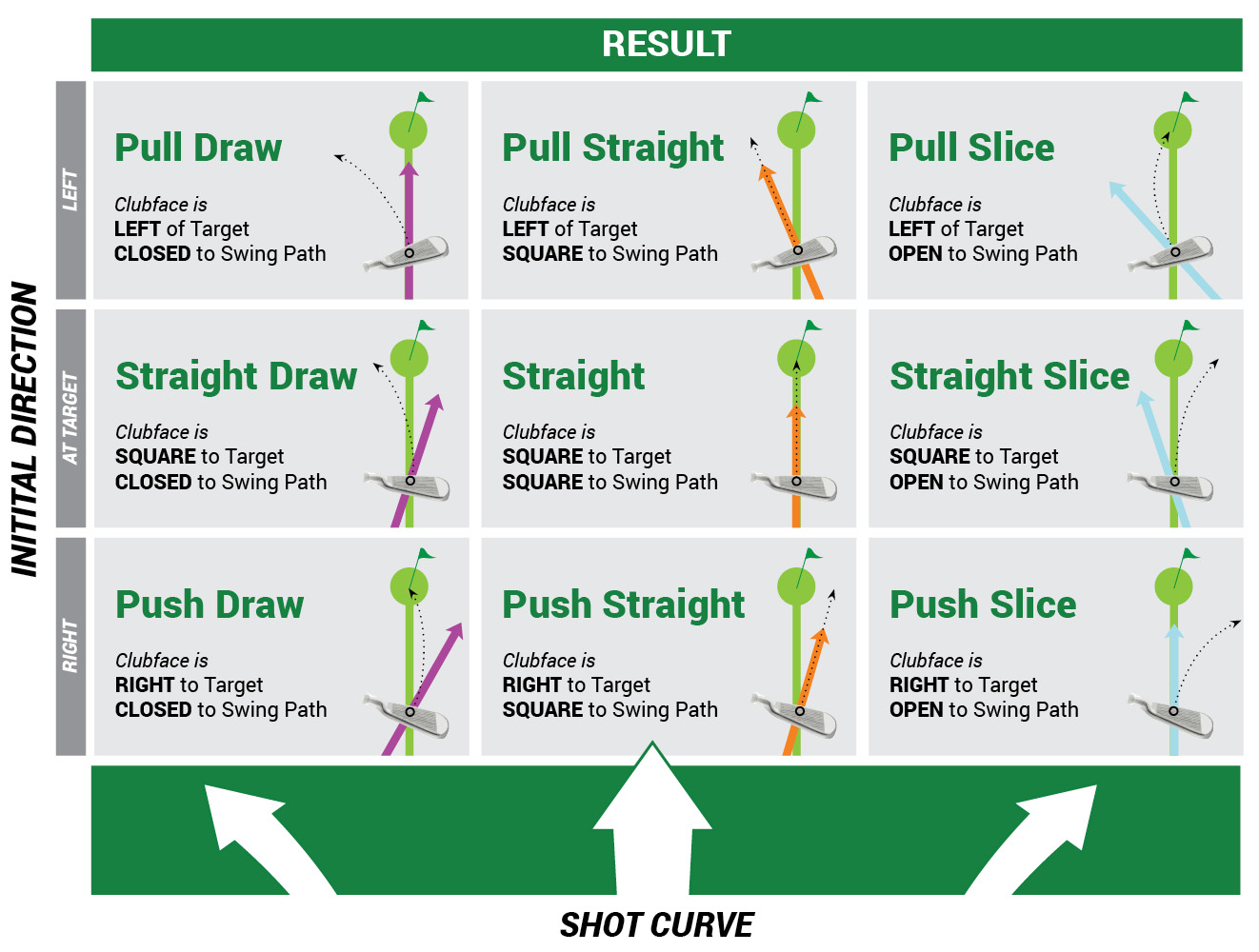
                        Ball flight laws.....face controls mostly the start direction of the ball. However, the inside out club path puts spin on the ball causing it to come back to the left.

                        Ball-flight-laws-shot-result-chart - The GOLFTEC Scramble
                        Last edited by braycobb; 04-15-2020, 05:50 PM.

                        Comment


                        • #14
                          Love the ball flight laws...very important. Thanks braycobb!

                          Comment


                          • #15
                            Thanks for the explanations, makes good sense.

                            Anyone have any thoughts on the Almost Golf ball? Are they worth the money? Are they soft enough that they won't damage the net? Is the company still in business? I went to their website but got a "page not found" error when clicking on the Buy Now link. The reviews on Amazon are very favorable, https://www.amazon.com/Almost-Golf-P...ews/B000MB6NE4
                            Last edited by billdz; 04-16-2020, 01:42 AM.

                            Comment

                          Working...
                          X