Golf Simulator Forum is the center point for discussion on golf simulator products, brands, manufacturers, launch monitors and everything else related to golf simulation.
If this is your first visit, be sure to
check out the FAQ by clicking the
link above. You may have to register
before you can post: click the register link above to proceed. To start viewing messages,
select the forum that you want to visit from the selection below.
Nice! Glad to hear you’ve got the project moving! I just finished mine up (98% anyway). I’ll post the build in the build section and link to it here. The curved screen is unbelievable
Tested out one of the Sony PHZ50 projectors last night. Now with all the lights on in the room it looks like my old optima did in the dark. Big improvement Expecially if I decide to add swing cameras later.
Uneekor will be delivered this afternoon sometime.
Had 10 contractors come through a day ago. So we are finally getting somewhere with all this.
This is really interesting and I'm looking forward to seeing how it turns out. I'm planning on building my space with a golf sim in mind, so something like this will be great to consider.
I'm interested in what you're planning from a hardware/software side of this build. Driving/synchronizing three projectors seems like it would be demanding, but I'd be most concerned about the quality of the image and how well it simulates when stretched to an extreme field of view as well.
It should be able to handle everything with out an issue. You end up losing around a projectors worth of the image with the blending software overlap. So game should be something around 3840 x 1200 for the usable image. If it turns out anything like my video here I will be extremely happy.
I just sold my gc2 and replaced with a uneekor for this project. Did a little testing of it last night and it's seems to be on par with the gc2 number and performance wise. Just a hair faster in tgc with the ball launch. Most likely BT vs hardwired is the difference.
BUT now is the sad part of tearing down my garage Sim so my friend can start taking it home. It had a good run 😢
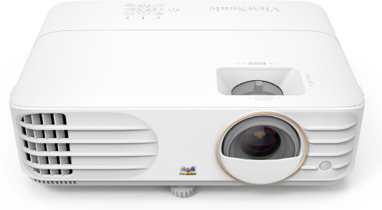
The PX748-4K is a 4,000 ANSI Lumens 4K home projector that shines in value and brightness and delivers pixel-perfect visuals in true 4K clarity with HDR/HLG support. Experience a whole new level of gaming with 4.2ms Ultra-Fast Input, a 240Hz refresh rate,...
This upcoming Viewsonic projector out soon, is not only 4K, designed to support gaming, can be mounted from the side or down the line (ok so it’s not lcd and throw ratio might be a challenge - but I assume if you’re putting in a curved screen, room depth might not be an issue) - it’s also got a warping tool to support projection on a curved screen AND it’s not gonna break the bank. Can anyone point out any obvious downsides to this projector (curved screen or not)?
This is the one positive to having the three projectors. The center image is very overlapped on each end. so even if you do get a small head shadow the other projector covers it up. I did some testing to be sure but at 10' from the screen (directly in front of the projector) I would only get a 1/2 heads shadow with 1 projector. I'm 6'4" so most everyone else in that situation would see nothing.
Even in my garage the projector was 19' back. The only shadow we had was the very end of the garage door rail that couldn't be avoided. The ceiling in there was only 9' 6". I should be mounting the projectors between 10' and 11' up.
I should note as well that the Sony projector looks fantastic in TGC. There is a ton more detail then I am used to seeing in my old sim. It is also extremely bright. Grass is defined and detailed vs before.
Sony even notes golf simulation on the product page for the VPL-PHZ50.
Keep in mind that the projector distance from the screen will be from the outer edge of the curve and not from the center of the screen. Just tossing that out there as I had to move mine back over two feet from where I initially mounted it. Mine is a short throw so going from 7’ to over 9’ is a pretty big jump percentage wise. I’m curious to know what your frame rates are in the end. Your gpu ain’t no slouch but I’m using a titan xp and in more demanding titles like Battlefield V, I was barely at 60fps at 4K. I’d love a brighter 4K projector but not with any stutter introduced in game
My garage is the exact length x width as the new room will be. Today I test hung the screen supports and a 10'x30' golf net in there. Looking at it I am now thinking of going bigger with the screen. Something in the 34'-36' range. extending it more into the side walls and not building as big of small fake side walls.
Garage is also a mess as I prepare to move everything out to a storage unit for the build.
Simulator build / house remodeling will finally start in May! We have a builder ready to go.
Emailed the pixalwarp company and was told the ultimate version would be the correct choice for my setup because of the difference in calibration (auto vs manual). The ultimate can calibrate using a webcam looking at the screen.
Simulator build / house remodeling will finally start in May! We have a builder ready to go.
Emailed the pixalwarp company and was told the ultimate version would be the correct choice for my setup because of the difference in calibration (auto vs manual). The ultimate can calibrate using a webcam looking at the screen.
Probably not a bad idea if auto calibration works. It’s a bit of a pain to do it manually. Not really a pain, it’s more like getting lost in a screen of red with white text and trying to stretch / warp with the mouse to align the words. If I’m physically drained, it’s a great exercise to relax lol. With three projectors, I’d opt for automating it more than likely
In May at some point they will be removing the roof from my garage and building a 2nd story room for the golf sim. The room will be 21' 6" by 25' 3" with a 11' ceiling height.
Currently the curved screen will be somewhere in the 32' to 34' range with the hitting area at 12' back. GC2 is now at a new home with a friend and I have a Uneekor XO ready to go.
Will be getting a mini split installed for heating/cooling the sim room.
This will be a long project especially since the builder is going to use the new room as a staging area for the rest of the house remodel.
We are also doing the following to the house-
Tile flooring
Replacing all Carpet
Replacing all interior doors plus front door
All trim is being replaced
Wainscoting
Coffered ceilings in main area
converting a bedroom into a closet for my wife
New fireplace conversion to gas
lights
Timeline is estimated to be around 4 months for the project.
Have to say so far the warping has been a pain. I still haven't managed to remove the overlap of the projectors outside of the auto-blend calibration. The software is not the most user friendly program. I keep getting what looks to be one desktop image only to have the mouse jump at the overlap points.
It looks like it will be even more of a pain once I move it from a flat wall to a big curve. Going to need to read the manual for the next week......




Comment