Announcement

Collapse
No announcement yet.

Garage Build - Please Help??

Collapse
X
 
  • Filter
  • Time
  • Show
Clear All
new posts

  • Garage Build - Please Help??

    I have been on here for a month and have learned a lot, so thank you to all. I am turning a portion of my 2 1/2 car garage into a golf SIM and need some help please. The dedicated SIM dimension for my garage is13' 3' X 20' with 13 1/2' ceilings and need some help deciding what enclosure, impact screen and projector to get.

    What I have so far:
    - GCQuad with Clubhead Measurement
    - Nice gaming laptop
    - FSX2020
    - 4x5 SwingTurf Mat

    Need Projector (Budget of up to $2K)
    - I am leaning towards the Optoma GT1080HD and having it sit on the floor but am open to any and all suggestions.

    Need Enclosure (Budget of up to $6K USD)
    - I would to like to keep the width of the physical enclosure to less than 11 ft
    - I would like it to be 3-5' deep (walls and ceiling of enclosure)
    - I would like to buy one that is easy to put together with no required trips to Home Depot

    I believe I am suffering from "paralysis by analysis" at this point so any clarity provided will be much appreciated!

    Thanks!


  • #2
    You can save a lot of money on the enclosure. Check out https://makerpipe.com for fittings. Then you can build your enclosure out of EMT tubing. Buy a premium screen from Carls. Add some golf netting for the sides and the top.
    I used interlocking exercise foam 5/8" thickness. Then laid down cheap outdoor turf/carpet. Find the spot that works for your hitting mat, then once you figure you can cut out the outdoor carpet/foam and your hitting mat will fit a bit lower.
    My space is 20 feet by 11 feet wide. My enclosure all in was probably 1700 CAD all in.

    With the extra money saved you can spend more on a projector. I have Optoma EH412 ST. it is 4000 lumens. I'm glad I went 4000, anything else would not be good in my opinion. 4K and 5000 lumens would be amazing. But that was another 1000 bucks or so.

    Maker pipe fittings 70
    EMT tubing 120
    Foam floor 400
    Carpet 200
    Screen 750
    Bunjees 50
    Net 250

    Comment


    • #3
      Hey Ryan,

      Congrats, sounds like you'll have a great sim space in no time! I've built several garage sims and can give you a few pointers... Do you have a picture of the layout of where the sim space will be? Easier to make recommendations. I also agree with what Lucas mentioned above, you can save yourself some money that way.

      Possible Enclosures under your budget...
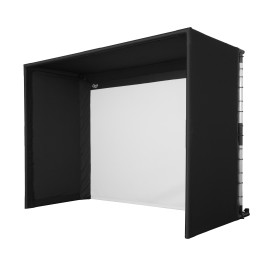
      https://rainorshinegolf.com/products/swingbay-golf-simulator-screen-enclosure
      https://rainorshinegolf.com/products/homebay-golf-simulator-hitting-enclosure
      https://rainorshinegolf.com/products/homecourse-pro-retractable-golf-simulator-screen-enclosure
      https://shopindoorgolf.com/products/...mulator-studio


      The Optoma 1080hdr is a very good short throw 1080p projector that I think you'd be happy with. Although I'd recommend you put it on the ceiling, I've tried the floor and hated it. Another common one that people seem to like although it isn't short throw is this Panasonic

      I'd also recommend you consider building stance platform and putting turf on top and insert hitting strip of choice. It looks good and it can be done very affordably...

      1) Buy 1.5" thick MMA Mats from Amazon, this is thick enough to insert almost any hitting strip and just the right firmness under foot to feel like a fairway. I’ve been using it for several years and think it is the perfect solution.
      2) Buy your putting turf, for budget conscious buy menards marine carpet, for a more premium experience buy from Turf Factory Direct
      3 )Buy your preferred hitting strip (I highly recommend fiberbuilt, your joints will thank you!)
      4) Measure your platform and cut your putting surface to size
      5) Place your putting turf onto your platform
      6) Place your hitting strip exactly where you would want it to go, mark it and cut out the spot in the turf and the platform (can be done with razor)
      7) Insert Hitting strip and you've got your self a great looking platform

      Comment


      • #4
        Originally posted by ryanbang2 View Post
        I have been on here for a month and have learned a lot, so thank you to all. I am turning a portion of my 2 1/2 car garage into a golf SIM and need some help please. The dedicated SIM dimension for my garage is13' 3' X 20' with 13 1/2' ceilings and need some help deciding what enclosure, impact screen and projector to get.

        What I have so far:
        - GCQuad with Clubhead Measurement
        - Nice gaming laptop
        - FSX2020
        - 4x5 SwingTurf Mat

        Need Projector (Budget of up to $2K)
        - I am leaning towards the Optoma GT1080HD and having it sit on the floor but am open to any and all suggestions.

        Need Enclosure (Budget of up to $6K USD)
        - I would to like to keep the width of the physical enclosure to less than 11 ft
        - I would like it to be 3-5' deep (walls and ceiling of enclosure)
        - I would like to buy one that is easy to put together with no required trips to Home Depot

        I believe I am suffering from "paralysis by analysis" at this point so any clarity provided will be much appreciated!

        Thanks!
        check out the enclosure kits at shop indoor golf or rain or shine golf. Comes with everyone you need and no special trips to Home Depot. And well within your budget without having to go here for this, and there for that.

        Comment


        • #5
          Why do you want to do a floor mount when you have such high ceilings? Take full advantage of that nice height and do a ceiling mount.

          6k is really high for an enclosure budget. Carl's has an all-in-one with enclosure and screen for a little more than half that amount.

          Engineered for High-End Indoor Golf SpacesCarl’s Pro Golf Simulator Enclosure Kit is designed for full-scale indoor golf installations that demand commercial-grade strength and a true course-like feel. With sturdy 2" EMT pipe framing (sold separately) and thick BlackStop™ performance fabric, it delivers an enclosed, immersive playing environment for pro-level training studios and high-end golf rooms.


          If you wanted to save a ton of money you could do it yourself. It's very easy. One trip to Home Depot and it will be functional in an afternoon. As Lucas said, you could re-invest the rest of the money into a better projector/computer/ whatever.

          Comment


          • #6
            Wow, thank you all for the wonderful insight! I spent a lot of time looking into projectors today and have a few new concerns. First, let me correct my ceiling measurement; it is 140"H. Second, I agree with the ceiling mount projector idea, thank you! Third, The projector will need to mounted 71" to 78" away from my screen which will put it between a florescent light fixture and a ceiling fan. Fourth, I am going to go with either a Carl's or the SIG10 enclosure which both have a impact screen height of 91"H.

            From my research I know I will need a short throw projector for this and am willing to spend more if needs be to get a bright and clear HD picture. Taking into account vertical offset and my required throw distance does anyone know of some projector options for me?

            Thanks!

            Comment


            • #7
              How for down does ceiling fan come? If it is closer to ceiling, then could you not just hang the projector from a mount behind the ceiling fan but a bit lower?

              the Panasonic that is mentioned above is the pt-vz580u.
              eiki 308u is another or for your budget there are some price shift 4k’s but lumens might not be enough. You could check out and see what refurb units Epson has at their refurb site as you might find a refurb eshift 4K for your budget as well.

              Comment


              • ryanbang2
                ryanbang2 commented
                Editing a comment
                Ceiling fan comes down 15” from the ceiling.

            • #8
              ryanbang2 the only projectors that fit that throw range are basically optoma's, so I'd probably go optoma 1090hdr. I'd recommend you mount it at approximately 9' from the floor so that you can minimize the amount of keystone correction you will have to use, also to completely fill a 91" tall impact screen your going to need to mount it at about 78" from the screen as you mentioned.

              Comment


              • ryanbang2
                ryanbang2 commented
                Editing a comment
                Thank you sir. I will check the 1090hdr option out.

            • #9
              The screen is 91 high but how wide?

              Comment


            • #10
              I had a typo above regarding mounting distance. Instead of 71-78” it is 85-92” from screen. However, I could mount in front of the fluorescent light fixture at 78”.

              Comment


              • #11
                If the fan comes down 15 inches off 140, then could you not mount the projector at a height of 9 or 10 feet? You could then use the Panasonic 580’s vertical lens shift to take care of the rest. Projector would be about 13.5 feet back. The only issue would be the lens shift at this distance would be 36 inches up or down and so this could be an issue that would require the projector to possibly be tilted down a little to get the image down to the floor.

                Comment


                • #12
                  My build is here:

                  Just a great forum with a ton of useful information! First post here. I'm beginning my enclosure buildout this week: 8' x 10', 1" EMT, and PR20 impact


                  I'm almost six years into it and it is still holding up. I went Flightscope X2 and had the room for a radar based system, which has been great because it also allows me to take it to the range once in a while. I am now looking at SIM integrations and will likely add TGC 2019 this year, as well as an additional LCD for a wall mount.

                  I still "roll up" my Sim for car parking and, other than some snow being tracked in, maintain everything with a leaf blower...still using the original Home Depot carpet and find it putts very fast, which is my preference. This is probably far more DIY than you're looking for, but honestly is cost effective and was an easy assembly.

                  Good luck!

                  Comment


                  • kirkemg
                    kirkemg commented
                    Editing a comment
                    in the midwest here, how do you deal with snow/sludge the cars bring in in winter? My garage sim is about to be live and this is driving me nuts because it's a mess.

                • #13
                  Usually I'll wait 1-2 days and then blow it all out (sand mostly) with a leaf blower. I should say, one thing though. I basically "roll up" my carpet and move some stuff to make the garage re-usable when required. That way, the mess is confined to the concrete surface and cleans up pretty quickly. Not perfect, but I accept my reality in New England (for now).

                  Comment

                  Working...
                  X