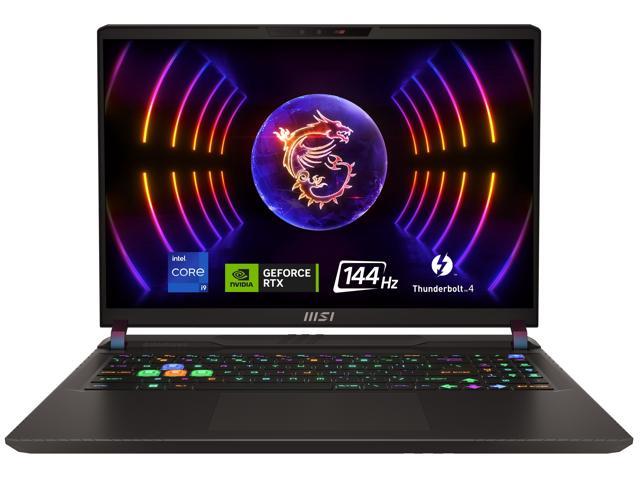
Hey guys, newb here. I’m building my first simulator setup. I’ve for a BLP and plan to run GS Pro, and possibly FSX. I’ve attached a couple of links to laptops that seem to be a good value and meet the requirements of both softwares. Just want to verify that I will get a good experience with one of these, and if one would be a significant advantage over the other? Thanks in advance.
Announcement
Collapse
No announcement yet.
Is this PC powerful enough?
Collapse
X
-
In my experience, if you can use a desktop computer rather than the laptop you will have a better experience. An RTX3070Ti in a laptop is much slower and gets hotter than does the 3070Ti in a desktop (UserBenchmark: Nvidia RTX 3070-Ti vs (Laptop) and will have more connectivity options (multiple HDMI/Display Port) vs a single HDMI on the laptop. Cooling and upgradability will also be limiting factors.
Most importantly though, you need to identify which software you want to me running, any other programs running simultaneously (cameras etc.)? These all factor into PC resource requirements.
That said, to answer your question directly, if you are committed to those two choices, I do not see material advantage one over the other so I would go on price.Last edited by jasonreg; 08-20-2023, 09:36 PM.
- Likes 2
-
I would get the 4070 mobile over the 30 series. It is more power efficient, I think that will lead to being able to use the GPU harder and longer in a laptop. Laptop computers have heat problems which lead to reducing clock speeds to keep them cool enough to run. The CPU is overkill on most of them, need nothing more then a i5 or 5 series AMD but they don't really sell that package. Any 7 series processor would be fine. I would recommend a cooling pad no matter what you do. Desktop will be better, but understand not always an option. 4k is a lot of graphics information to process, it is 4 High definition screens at the same time. So you are doing at least 4 times more work to go from1080p to 4K. Add in a second 4k screen/monitor and you are now moving a lot of pixels. Here are ones I like. Have had MSI and liked it. Razer is a nice brand but verry expensive for what you get. If you buy from costco you have a very good return policy if things do not work out.
4070 laptops
4080 Laptops:
Buy MSI GP Series - 16'' FHD+ 144 Hz - Intel Core i9-12900H - GeForce RTX 4080 Laptop GPU - 16GB Memory DDR5 4800 - 1TB PCIe SSD - Windows 11 Home 64-bit () with fast shipping and top-rated customer service. Once you know, you Newegg!
Comment
-
Thanks for the feedback guys. I don’t think a 4k projector will be in my budget, so likely just running 1080p if that makes much of a difference.
The simulator is going out back in my shop. Would definitely prefer the portability of a laptop if I can.
Comment
-
Originally posted by hamviper View PostI would get the 4070 mobile over the 30 series. It is more power efficient, I think that will lead to being able to use the GPU harder and longer in a laptop. Laptop computers have heat problems which lead to reducing clock speeds to keep them cool enough to run. The CPU is overkill on most of them, need nothing more then a i5 or 5 series AMD but they don't really sell that package. Any 7 series processor would be fine. I would recommend a cooling pad no matter what you do. Desktop will be better, but understand not always an option. 4k is a lot of graphics information to process, it is 4 High definition screens at the same time. So you are doing at least 4 times more work to go from1080p to 4K. Add in a second 4k screen/monitor and you are now moving a lot of pixels. Here are ones I like. Have had MSI and liked it. Razer is a nice brand but verry expensive for what you get. If you buy from costco you have a very good return policy if things do not work out.
4070 laptops
4080 Laptops:
Would you recommend the below laptop below, as comparable to the 4080 you posted above? I’ve found this one for $1,779 from Antonline.
Buy HP Omen 17.3" Notebook QHD 240Hz Intel Core i7-13700HX 16GB RAM 1TB SSD NVIDIA GeForce RTX 4080 12GB Shadow Black with fast shipping and top-rated customer service. Newegg shopping upgraded ™
Comment
-
It should do fine. That chassis may not be the best for heat dissipation but the 4080 is a fast GPU. If you do a google search there may be a youtube review on this exact unit. Performance can go up or down a whole class of GPU based on heat dissipation capabilities, but this means you will have at a minimum a 4070. I have a 2060 in my laptop that is faster then almost every 2070 laptop made that year due to good heat management and design. Laptops are not as easy as desktops to get similar performance from. I think you will be happy with it, just make sure you buy from someone you can return to in case something doesn't work right.Originally posted by Tx2va07 View Post
Would you recommend the below laptop below, as comparable to the 4080 you posted above? I’ve found this one for $1,779 from Antonline.
Comment
-
Thanks for the feedback. Would I even be better off going with a cheaper desktop option like the one below, rather than one of those laptops with a little higher performance numbers?
Comment
-
The 4080 laptops will probably be in the ball park or close to a 4060ti. Again do some review checks just type 4080 mobile vs 4060ti. In all cases a desktop is a lot faster then a similar desktop. I have not seen anyone running FSX at 4k on a 4060ti yet so no idea as to how it will run. Probably pretty good, just no confirmation. My 4070ti is only loaded at 60-80% at 60 frames per second 4k ultra on projector with a 1080P TV playing you tube videos, less GPU load in GSpro. A 4060ti desktop will probably have to run full out for the same performance as my 4070ti at 60 frames per second but should do it. Honestly I think you would be very happy with that HP with the 4080. It looks like a beast of a laptop.
As a note, most projectors struggle to run at greater than 60 hz which is 60 fps, I limit my frame rate there. There is no need to run a system that can do 150fps, you cannot display it. Mine projector claims 120hz but in the fine print you have to turn off zoom and corner adjustment to get it, which I cannot do for placement reasons. So 60hz/60fps is all I get. Never notice, looks amazing. Golf sims are not fast paced first person shooters, you don't need 120 fps in my opinion. I played the entire new Jedi game on it and never noticed the lower frame rate. Good luck.
Comment
Comment