Announcement

Collapse
No announcement yet.

Projector Help

Collapse
X
 
  • Filter
  • Time
  • Show
Clear All
new posts

  • Projector Help

    I'm buying a TrakMan and started the build out recently. I'm sure this has been posted a gazzillion times, but here's a gazzilon and 1. SIM enclosure has 8x12 impact screen, 16:10 aspect ratio and was curious what projector is good/decently priced and how far/where this should be positioned in relation to the screen. I'm planning on plaing the SIM 9 feet from the screen, unless someone recommends something different.

    Thanks in advance for your feedback.

  • #2
    Do a search in this site for Eiki and also for Panasonic. There are two projectors around $1500 or so that a few people have had good results with and you can read in their experiences here. Please note that these are not 4K projectors and you may want to consider the laser 4K projector that a few here have purchased as well. Another option is to watch the Mr. Shortgame episode on YouTube where he talks about the projector he bought for his TM. Another member here has a video on a 4K laser as well (think it was the Benq).

    once you get your projector, contact TM support and ask them to load a file into your system that allows you to configure a resolution that will fit your screen better and display at the projectors resolution (you should note that the max resolution for VG2 is not 4K yet - maybe something they could announce next week, likely not but you never know).

    on the dimension side, are you hitting 9 feet from the screen? I thought TM suggests 10 feet min?

    good luck with the build.

    Comment


    • #3
      Forgot to mention having a look at projector central for distances etc. Someone posted a video in the last month here that is pretty good at helping set up and choose projectors for golf sim.

      Comment


      • #4
        Originally posted by bouchermb View Post
        I'm buying a TrakMan and started the build out recently. I'm sure this has been posted a gazzillion times, but here's a gazzilon and 1. SIM enclosure has 8x12 impact screen, 16:10 aspect ratio and was curious what projector is good/decently priced and how far/where this should be positioned in relation to the screen. I'm planning on plaing the SIM 9 feet from the screen, unless someone recommends something different.

        Thanks in advance for your feedback.
        Questions:
        1) How high are your ceilings
        2) How far out does your enclosure extend?
        3) What is your budget?
        4) How important to you is 4k and do you have a computer that can handle it?
        5) How much ambient light in the room?
        6) Do you have any constraints limiting where on your ceiling you can put the projector?

        As mentioned, www.projectorcentral.com is an amazing resource.

        Comment


        • #5
          Ceiling height is 8 1/2 feet, which is a bit restrictive, but I’m 5’6, so I can still swing a driver. My enclosure extends out 5 feet, I’m budgeting about $7500 for everything, I’m going to buy a gaming PC, I have a good amount of ambient light, since it’s a elk out basement with a couple windows, my max distance I have length wise is about 17 feet, but I can go further back if I juggle a couple things around, but my max width is about 13 feet.

          I really appreciate all your input and have already learned a lot on this forum.

          Comment


          • #6
            If you can find a way to swing more room then definitely try and get as much as you possibly can. I assume you are getting a TM4, which needs at least 7 feet from front of unit to ball and then 10 feet of ball flight. The unit will be about 7 inches from wall to front and then you also need oil behind your impact screen.

            Comment


            • #7
              Originally posted by bouchermb View Post
              Ceiling height is 8 1/2 feet, which is a bit restrictive, but I’m 5’6, so I can still swing a driver. My enclosure extends out 5 feet, I’m budgeting about $7500 for everything, I’m going to buy a gaming PC, I have a good amount of ambient light, since it’s a elk out basement with a couple windows, my max distance I have length wise is about 17 feet, but I can go further back if I juggle a couple things around, but my max width is about 13 feet.

              I really appreciate all your input and have already learned a lot on this forum.


              I would look at the BenQ TH671ST (~$700) and the BenQ TK850 ($1500)

              TH671ST is an affordable short throw. People around here seem happy with it. Link below suggests you would mount at around 9', which should work well with your setup.
              Calculate the perfect throw distance and screen size for your BenQ TH671ST projector with the ProjectorCentral Projection Calculator Pro.


              TK850 is a longer throw 4k projector. Be careful of shadows due to your lower ceilings.

              Make sure you are aware of the required mount height. Some short throws (Optoma) require the projected to be mounted 12-18" above the top of the image. I'm not sure that would work so well for you given your ceiling height and enclosure height.

              Are you planning on running 16:9 native on your 16:10 screen? FWIW, that's what I do and I think it's fine.

              Comment


              • #8
                I already re-arranged my basement, so 10 feet between Sim and screen isn't a problem, Are you talking about a Trackman 4? Wish I could, but don't have the budget, so not sure what the setup consists of, so am in the clouds about what oil behind the screen means or what needs to be 7 inches from wall to front. My height I'm dealing width is under 9 feet and the enclosure is 8x12.

                I'll take a look at the BenQ TH671ST now, and spend some time on projector central, and that seems to be good for my app. I'm completely lost on the aspect ratio/throw ratio and technology specifics and would you recommend I run 16:9 native on my 16:10 screen.

                What exactly doe this mean? Sorry and I'm just trying to understand everything involved here and learn as much as I can.

                Comment


                • Dax
                  Dax commented
                  Editing a comment
                  Sorry that was a typo I meant room behind the screen.

              • #9
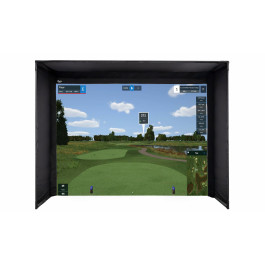
                Here's the setup I'm looking at if that helps.

                Get a seamless floor-to-turf image while practicing golf at home! Carl's Place DIY Golf Simulator Enclosure Kits are crafted to bring the feel of professional golf right into your home. Includes our impact screens that let the image go all the way to the floor, durable nylon enclosure, and the fittings to build your frame. We’ll even tell you exactly what pipes you need or make it easy with our Pipe Framing Kit for a hassle-free, all-in-one solution. With our High-Contrast Gray Premium Golf Screen, you’ll enjoy improved image contrast and clarity, especially in rooms with ambient lighting, for a more immersive visual experience. 


                I'm wide open to recommendations on what to do from here and actually need to here them :-)

                Comment


                • #10
                  I was going to get 6 foot net extensions as well.

                  Comment


                  • #11
                    How about this one. I saw that it's 16:10 aspect ratio.

                    BenQ MW632ST projector specs, projector reviews and current street prices.


                    Comment


                    • #12
                      I know I said TrackMan. I meant SkyTrak. Sorry about that.

                      Comment


                      • #13
                        I'm no expert but I'll tell you what I think I know.

                        Aspect ratio is width:height of the image.

                        Most projectors are 16:9 ratio. Your screen is 16:10. So is mine. You can find 16:10 native resolution (think of native as the natural, or best resolution) but it's rare and usually more expensive. You can change the aspect ratio of a 16:9 native projector to 16:10 or 4:3, but you may lose part of the image.

                        A 16:10 ratio on your projector will fill your screen perfectly. Personally, I'd buy a better, 16:9 projector for the same/less $$ and have a small black part above/below your image. The 16:10 projector you listed is below 1080p. My preference would be to buy at 16:9 1080p and have some black space. But to each their own.

                        It might be worth your time to spend 30 minutes googling aspect ratio, resolution, throw ratio, etc. As someone that just had to return a projector, it's worth the time beforehand.


                        Comment


                        • #14
                          Originally posted by bouchermb View Post
                          I know I said TrackMan. I meant SkyTrak. Sorry about that.
                          tomato tomahto

                          Comment


                          • #15
                            I'm losing my mind

                            Comment

                            Working...
                            X