
Great site to compare projectors and check throw distances.
-
Last edited by Maverick; 09-18-2014, 06:37 AM. -
I have a question about the projector calculator at projector central. When I look at the BenQ 1080ST I see a measurement called "vertical distance from the center of the lens to the lower edge of the image" and it gives the measurement as -2.
What exactly does this mean? Does it mean that the only place you can install the projector is 2 inches below or above the screen? Can you go outside of those measurements if you use keystone correction, or is that measurement using keystone correction? I feel clueless.
Can someone give me a brief education on this? Thanks! -
All that is saying is the bottom of the projected image(floor mount), or top of the image if ceiling mount, will start 2" above(floor mount) or 2" below(ceiling mount) the center of the projector lens.
So, to know where the top of the image will start on the impact screen, you would add 2"+height of you ceiling mount+distance from top of projector to center of the lense.
We will start a Projector 101 section soon.Comment
-
Okay, so I read about keystone correction. Is that the measurement (-2) of where to put the projector without using any keystone correction? And then if you want to use keystone, you can go higher or lower?
This is what is posted on the BenQ site for the W1080ST specs:
Keystone Adjustment 1D, Vertical ± 40 degrees
Projection Offset 105%±5%
I must admit I don't know enough about projectors to know what this means.Last edited by Maverick; 09-18-2014, 10:47 PM.Comment
-
No, keystone is used to square up the sides with the rest of the image, when the projector is mount on a tilt. If using a ceiling mount, the projector will be pretty level and the image will pretty square. No need to worry about keystone correction. It's there if you need it.
There's nothing you can do about the 2". I would not worry about this for you setup since you're going to ceiling mount it in the garage, right?Comment
-
Yes, and this is exactly the explanation I needed. Thank you !Originally posted by "Zmax" post=233Comment
-
A wise man once said:
"build your own enclosure with impact screen, buy a mat, projector and then decide what sim to go with"
I am now researching projectors and screens.
I have will have 10' ceiling and unlimited length and width for my sim. I want to create a panoramic screen.
Anyone have any experience with this set up and/or suggestions for projector?
I am going to write Cory at Par2Pro to see what he can put together, but I thought I would start here first.Comment
-
What do you mean by panoramic screen? Are you referring to widescreen? Sim Surround with 3 projectors? Curved Screen?Comment
-
Curved Screen, but not 3 projectors.Comment
-
Not much info on curved screen. Here is a video
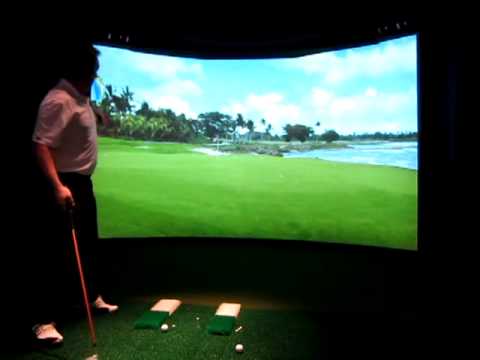
. Perhaps contact HD golf. Keep us posted how you do it.Last edited by Maverick; 09-16-2014, 10:29 PM.Comment
-
Emailed Cory. Since he is a pretty busy with the PGA show, we decided to look into it when things slow down a little bit for him upon his return.
I will let you know what I find out when we communicate again.Comment
-
I don't have any experience with curve screens, but I wonder if you need a special lens for your Projector in order to do this.Comment
-
I was thinking the same thing about the special lens, but I have not found a short-throw projector with a lens like that yet.Comment
-
Okay, so I bought a used PJ on Craigslist. I got an Optoma GT760 with 70 hours on it. I set it up in my garage to test it out. It is projecting on my wall as I don't have a screen yet. I have to say that I am pretty thrilled with it. First off, it is not 1080p. However, it still looks great! It is 16:10 native, and I think it is really bright. I installed Black Flag (came with my new video card) and used it as a test. Visually, the game is stunning. I also installed my Optishot and gave it a test also. It also looks great.
I have to say, that for a relatively inexpensive PJ, it is really dynamite. And it's ultra short throw to boot.

 Last edited by Maverick; 09-18-2014, 10:51 PM.
Comment
-
Cool. What size image is that? What screen and image size will you be using?Comment


Comment