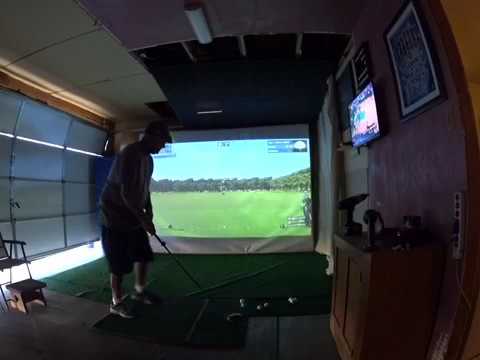
Here's a video of me hitting balls with the Rmotion golf simulator. I hit some 7 irons and driver then a couple of chips and putts. It seemed to have issues with my driver today. It was reading almost everything going left even when I clearly hit it right. Not sure why. I was hitting balls before recording and it was reading my driver just fine. Also, unfortunately you can't make out the swing data on the video. I was using an action cam and I can't zoom. Next video I'll just put the camera closer to the screen. I understand there are ways to edit the video and zoom but I don't know how to do that.
Announcement
Collapse
No announcement yet.
Rmotion video
Collapse
X
-
I played some more after the video and after a very small adjustment to the sensor, my drives were working well. Right went right, left went left. Unfortunately for me, another clip broke when swinging. That's the 2nd one that has broken for me when hitting a ball. Again, I only hand tightened these and even backed off on the ones I still had after the 1st one broke. To me these clips are the biggest issue. I was trying to play a round of golf and it's a lot to do moving the sensor to the clips and then using putty for the ones that don't have clips. Lining up the sensor each time when using the putty can be tough sometimes and I had it fly off the shaft once. I really enjoy hitting balls on the driving range though. Leaving the clip and sensor on one club and just hitting over and over is great. Then switch to another club and do the same. Playing a full round not so much fun for me right now. I really hope Rapsodo comes up with a much better clip. I fully intended on buying the 10 clips when they came available but not now. Breaking 2 clips in just a couple of weeks just swinging the club is no good for me.
-
Great video jb50!!! I got my R Motion several weeks ago and am need to purchase my gaming laptop, a net and some almost golf balls. Been kind of hesitating a bit due to the problems folks are having and am waiting to get a family discount on a laptop. The clip thing seems like an issue as well. I think when I have my setup ready, I am going to buy the additional clips and use maybe 8 or 9 clips. I don't anticipate on using all my clubs when practicing/playing. But we will see. How fun has the actual game play been? Do you only use real golf balls? How quickly can you play an actual round? Are you using a gaming laptop or a gaming desktop? Your setup looks awesome!!! I'm trying to decide if I should use a projector or a TV. Probably get a new TV and move the old one upstairs. So many problems with limited funds!!! LOL!! Thanks for the video. Makes me want to get my a$$ in gear!!
Comment
-
Thanks Orrsome. I really like the Rmotion. I've only previously used the Optishot and think the Rmotion is better and believe it will eventually be much better. My biggest issue is the clips. I've had two break already and it's only been a couple of weeks. I have not played a full round because it's just too much trouble moving from club to club. I think I've been pretty clear the clips are the only real con I have. I've emailed back and forth with Rapsodo my concerns about the clips and they have posted they are working on it. Really hope they come up with something good. Another con is low spin on wedges. This seems like it should be an easy fix so I'm sure they'll address it. I just got done hitting about 50 balls on the mthunt driving range and it's a blast. I really feel like I'm getting good feedback as opposed to the Optishot when I just wasn't sure. I hesitate to recommend the product at this point but I would say if you don't have or want to spend the $ on the higher end units then this is what I would get. Rapsodo seems like they are dedicated to this simulator and it's my humble opinion it will only get better. Sorry, rambled a bit. Back to your questions. I have only used real golf balls so far. I do have foam balls so I can try them next time. There is a setting to change to almost golf balls. Not sure if it works well or not. I will say I played with foam balls for about a year and a half with the Optishot and the feedback you get from real balls doesn't even compare. If you can set it up to hit real balls I would definitely do that. I have a gaming desktop I built. I put in a GTX 980 and it runs TGC very well. There's a lot of info here on the PC requirements of TGC and pros/cons of laptop vs desktop. Also don't forget about a good hitting mat. I just ordered a new one. The one I'm hitting off of is probably 15 years old and it's killing me when I hit fat. Good luck. Lots of info on here. Don't hesitate to ask. Everyone is very helpful.
Comment
-
orrsome
I second what Jb50 stated about R Motion versus Optishot. Much more accurate readings with the main key being consistency. Not even a close comparison to be honest. I also second the customer support Rapsodo is putting into this.
My recommendation to you is a gaming desktop. I had one built for $500 with a GTX 970 gpu. The key with TGC is the gpu as it is graphics intensive. The reason for the desktop is for future upgrades. It can be difficult to upgrade the gpu (or anything else) on a laptop.
I use almost golf balls and they work very well. Almost golf balls are very different than foam as it gives more of a feel of impact.
You can play a round of golf in an hour or so. The clip thing is a huge issue but you can try the putty method, it works well but takes a little longer to move it between clubs (not much though).
I run mine to both a projector and a 55" TV (not at the same time). I use the TV when I want a quick practice session and I use the projector when I play a round. Either one works well but the projector obviously gives you the SIM feel.
Good luck and enjoy!
Comment
-
-
I wish I had the luck you are having. I can only play in debug mode where some sanity checks are disabled. But then I get a smorgasbord of shots, some way left, some way right, some short, very very few with a flight path as it should be. I also miss on putts a lot and I'm trying to understand how to setup for a putt if the greens are slopped. I wish I could help Rapsodo. I don't really know what else to do except run with debug. Maybe he'll have a new version of the driver in the works.Courses Created:
Cresent Hill KY (L)
Cherokee Park KY (L) 9
Seneca GC KY (L) 18
Charlie Vettiner KY (L)
Comment
-
Why would the offset matter for R Motion? As long as the clubface is square at address, you could be aiming sideways. Am I mistaken on this?
-
Agree heman, it shouldn't matter for Rmotion provided you swing on the same line as established at address. That's one of the nice features of rmotion, you can easily move around and aim anywhere so can reduce wear on one spot of the screen (especially when practicing).
However there is a psychological component as well. Some people find they subconsciously pull the ball to the center target when hitting offset. So their address target line might not be the same as at impact.
-
I hear what your saying and I'm sure you are correct. For me though I like it better being square to the screen so moving the aiming circle is better for me. I think I was doing exactly as Faulty says. I was trying to hit the circle and probably didn't have the club square to the circle at address and shots were going left. Just made it easier for me.
-
-
Unfortunately a gaming desktop just isn't in my future. I built my last desktop and it sits in my office like a huge paper weight. I love the plug and play technology but don't want a dedicated machine for just indoor sim golf. Graphics shouldn't get that more intense with this product and if it does then oh well. My main focus is to swing the club and have a bit of fun. Not trying to get massive data or get better. Too late for that plus I have back issues (I feel ya TW!!!). Hope to have it up and running in the next couple of weeks. Thanks for every one responding and posting their experiences. Awesome stuff.
Comment
-
Will TGC work on a "not-optimally" spec'd computer?Originally posted by orrsome View PostUnfortunately a gaming desktop just isn't in my future. I built my last desktop and it sits in my office like a huge paper weight. I love the plug and play technology but don't want a dedicated machine for just indoor sim golf. Graphics shouldn't get that more intense with this product and if it does then oh well. My main focus is to swing the club and have a bit of fun. Not trying to get massive data or get better. Too late for that plus I have back issues (I feel ya TW!!!). Hope to have it up and running in the next couple of weeks. Thanks for every one responding and posting their experiences. Awesome stuff.
Comment
-
Honestly, it is really what an acceptable level of "work" is for you. For me, no. You have the ability to adjust the display resolution, tree count, and other things that will allow TGC to run but IMO it won't look good. I think you would find it disappointing to spend the money on everything for a golf SIM only to have it play pixelated and choppy. But then again, maybe it will work for you.Last edited by HeMan; 04-19-2017, 12:41 PM.
-
What does "work" mean? What does "not optimally" spec'd mean?
You'd have to be much more specific to get a meaningful answer. For full quality best to go with protee's recommended hardware. They do so for a reason. But for sure tgc will run on less, just not as well. Only you could say if the difference matters.
Personally I wouldn't go below protee's minimum specs, lesser computers will work in some fashion but the cost savings are small considering you'll be running tgc in poor quality for the rest of your life.
That said their are people on this board who run tgc on a potato and claim it runs great so there's no accounting for taste.
-
-
Let me clarify my statement. I'm going to get a gaming laptop. A gaming desktop would be the most ideal option as they allow much more room for upgrading but I like the mobility of a laptop (plus it is an easier sell with wifey). Now with that being said, I'm going to try to get a graphics card of GTX 1050 or higher. TGC should change too much but if it does I won't be too concerned as the machine will run the older version and if I decide to upgrade to the full version I will have enough courses to keep me busy as long as my back, wrist and achilles holds up.
Comment
-
i5 / 8Gb / GTX1060 6Gb works fine with TGC. Desktop PC ~$850. Laptop ~$1500. This looks great for only $1199: https://www.microsoftstore.com/store...tID.5087521000
-
-
I purchased an HP Omen i7 16GB ram GTX 1050TI and have been very pleased with the results. It runs TGC easily on medium settings though not at anything over 1080p which is fine for me, no 4k projector or TV in this house. It works great and is very quiet even at high load, I recommend Protees computer if you have the cash, but I had a discount with my company on the HP which made it too good to pass up. I will say that if you have the budget the 1060 is worth the upgrade. Wish I had forfeited up the addition money for longevity as the game seems to get more and more demanding on the hardware.
Comment
Comment