Announcement

Collapse
No announcement yet.

CO Garage Sim Setup

Collapse
X
 
  • Filter
  • Time
  • Show
Clear All
new posts

  • CO Garage Sim Setup

    Hi all,

    Former lurker, first time poster as I've finalized my Garage simulator setup I'm anxious to pull the trigger on.
    I have already acquired the SkyTrack and laptop for an existing basic setup hitting into a tarp with PVC homemade cage. I am now finally able to upgrade to a projector and displayed screen background!
    Any advice is greatly appreciated, thank you in advance!

    Hardware Setup:

    Projector:
    Optoma GT 1080 Darbee
    Manufacturer of award-winning projectors for business, education, professional audio/video and home entertainment


    Screen:
    Carls Place Premium Impact Screen


    Cage:
    Carls Place Golf Enclosure 12'W x 9'H 8'D
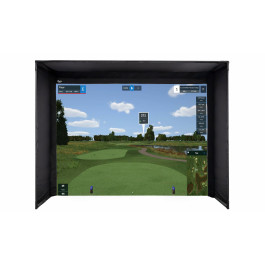
    Get a seamless floor-to-turf image while practicing golf at home! Carl's Place DIY Golf Simulator Enclosure Kits are crafted to bring the feel of professional golf right into your home. Includes our impact screens that let the image go all the way to the floor, durable nylon enclosure, and the fittings to build your frame. We’ll even tell you exactly what pipes you need or make it easy with our Pipe Framing Kit for a hassle-free, all-in-one solution. With our High-Contrast Gray Premium Golf Screen, you’ll enjoy improved image contrast and clarity, especially in rooms with ambient lighting, for a more immersive visual experience. 


    Computer: (Procured)
    Acer Predator Helios 300

    Bigger, stronger and with plenty of power to spare. Tackle every game with Helios at your back.


    Launch Monitor: (Procured)
    SkyTrack
    Transform any space into a tour-caliber golf experience with SKYTRAK. Access professional-grade launch monitors, immersive course play, and precision shot-data analysis. Trusted by golfers of all levels to lower their scores, improve swing mechanics, and master course strategy at home. Shop the #1 rated launch monitor.


    Hitting platform:
    TrueStrike Single Golf Mat
    The realistic performing golf mat TrueStrike's online store


    Garage Layout:
    (see diagram)
    notables - Overhead view, Projector will be on the ground with built in enclosed 9' to impact screen


    Questions/Concerns before pulling the trigger:
    Hardware compliance - Any red flags off the bat? best hardware for current setup? Is there a better projector I should be looking at within ballpark.
    Screen 9 feet back from projector/forward of hitting mat, is this normal/ideal?
    Required distance between impact screen and back wall to prevent any damage to the back wall?
    Anything I am forgetting about/overlooking?

    Happy to provide more detail if needed -Thank you again for your time!

  • #2
    What is the max you can go for screen width in your setup? If you can go wider than 12 ft then you will be much happier. I recommend 16 ft wide if you have the room. Because on 12 ft wide screen with image format at 16:10 or 16:9, you won't reach 9 ft high image on screen. At 12 ft wide, your image height will be closer to 7 ft tall which won't seem like a large screen when hitting into it. If you can go wider screen like 16 ft then you can reach a good screen/image height of 9 ft. Also you will be able to hit directly in center of mat and screen and won't need to use horizontal offset in TGC software.

    I would recommend this projector:
    BenQ HT2150ST. This one is on Amazon at: https://www.amazon.com/BenQ-HT2150ST...dp_ob_title_ce


    Here is my recent garage setup for some additional tips:
    Hey! I'm finally back to sim golfing! Just finished my new build! I moved to a new house and haven't had my golf sim for a year or more. A lot of work has been done

    Comment


    • #3
      I’m looking at setting up something similar but I have less space.

      Isn’t the projector where your left foot will be? I think most would advise to ceiling mount the projector, but I want to floor mount it also, so that I can move it to a different room for movies.

      I’ve seen it advised on here to have 12” between screen and wall, but I’m hoping to reduce this a bit, as I’m so tight for space.

      Dan

      Comment


      • #4
        I just used this projector and on a 16:9 foot screen had it a little less than 8 feet away from screen and about a foot above it. It’s all about placement w the Darby and took me a couple calls into Epson and a calculator to get it perfect.

        Comment


        • #5
          Might want to have a look at this projector. InFocus IN138HDST. One of the members just purchased and loves it.

          Comment


        • #6
          Mike80

          first of all that is a very nice set up that you have. I’m definitely a little envious.

          unfortunately I can not go larger than 12’ wide so I was going to go with a 4:3 format to hopefully fill my 12x9 screen. What is your opinion with a 4:3 format?

          does the benq ht2150st support 4:3 format? I was looking at the specs on benq website and didn’t see it?

          thank you for your feedback. I appreciate any advice you can give me

          Comment


          • Mike80
            Mike80 commented
            Editing a comment
            stange_colo I would assume that projector supports 4:3 format. Most projectors support it. Just look up the user manual and search for aspect ratio and see if you can find what this model supports.

          • Mike80
            Mike80 commented
            Editing a comment
            stange_colo I looked up the user manual. The BenQ HT2150st does support 4:3 and 16:9.

        • #7
          DannyMRICS

          im trying to go with a floor mount for a couple of reasons. by going with a floor mount I eliminate any issue of shadows, accessibility of projector for other uses and for some reason I think it’s less likely to be hit with a ball. Opinions?

          Because my garage slopes towards the doors I’m going to build a hitting platform to level out the hitting area. Hopefully one day add appliance leveling screws to the bottom of the platform to tilt the platform in different directions to practice side hill lies. in the cavity of my hitting platform I’ll place the projector and put up clear plexiglass for protection. Suggestions for better projector setup?

          since I’m offsetting the hitting platform for swing space it should, fingers crossed, place the projector in alignment with my feet and the center of the hitting cage. Is this ideal?

          im trying to have as little space as possible between screen and back wall. Right now I’m planning on about 8-10” and I’m going to add medium density foam to the wall behind the screen.

          any suggestions, opinions, and/or advice you can give me would be amazing

          Comment

          Working...
          X