Announcement

Collapse
No announcement yet.

The evolution of my sim room

Collapse
X
 
  • Filter
  • Time
  • Show
Clear All
new posts

  • The evolution of my sim room

    Since I’m now on version 3.0 of my sim room, I figured I would post up the history of the room and then update the current build as it continues.

    My sim room is the formal living room. It is 16 ft deep by 13 ft 7 in. wide with 9 ft 1 in ceilings. I can swing driver, but get the lefts indoors if I do too much so I’ve stopped hitting it. The room is south facing and as you can see receives a ton of natural light. Based on room size 4:3 aspect ratio makes sense.

    The room (screen to go opposite wall of two windows):
    Click image for larger version  Name:	5F0B2471-068F-466A-938E-1D8091FF752E.jpeg Views:	5 Size:	83.8 KB ID:	264686

    VERSION 1.0...........
    - I began with a 1” EMT frame (avoid 3/4”) - 10 ft wide
    - taut net behind screen and black silk sheet
    - foam pipe insulation
    - 9oz SuperTex screen
    - thin residential 5x4 mat
    - SkyTrak
    - Optoma GT760a 720p projector
    - modified HP desktop PC with GTX750ti GPU

    After first hanging the screen:
    Click image for larger version  Name:	27A01E0A-EA11-45D4-8A15-1ED7E2929581.jpeg Views:	5 Size:	76.0 KB ID:	264687

    Wife ran over my wall protection lol - memory foam glued to wood and thin plywood frame:
    Click image for larger version  Name:	BE620094-8C5C-4C0E-84CA-30F832C7DDDC.jpeg Views:	6 Size:	45.9 KB ID:	264688

    Put up the wall protection and computer cabinet (IKEA secretary’s desk) that folds closed.
    Click image for larger version  Name:	BBB72CCA-592E-4B01-9A78-7CB06B5E838D.jpeg Views:	5 Size:	117.7 KB ID:	264689

    Couches and canvas golf paintings to complete Version1.0:
    Click image for larger version  Name:	9F54A19E-2187-4DBA-9EFC-B4EE6E2B94A9.jpeg Views:	5 Size:	63.9 KB ID:	264690

    ————————————

    VERSION 2.0..........
    - Direct from Mill screen ordered 13x10 so I’d be able to rotate hitting spot
    - GC2 that came with Creative Golf 3D to add to TGC
    - upgraded to GTX1060 6GB GPU
    - thicker mat and eventually cut in a Fiberbuilt strip
    - screen attached to EMT on top with pole clamps and used tarp clamps on side. All foam insulation now gone (not needed)
    - Upgraded to Optoma GT1080Darbee
    - Upgraded cabinet in corner that holds a couple sets of golf clubs (old one in v1.0 not shown)
    - Upgraded curtain to keep out excessive light during the day

    Click image for larger version  Name:	7DE3C886-C1B4-45C4-AAA5-F8126F75A314.jpeg Views:	5 Size:	55.2 KB ID:	264691

    New cabinet for club storage and also shows the new curtain track installed on the ceiling:
    Click image for larger version  Name:	1C1F3588-6D00-49F3-A454-D4650F04ED61.jpeg Views:	5 Size:	46.9 KB ID:	264692

    Curtain needed because of all this light... note: you can see the window curtains in this pic as well:
    Click image for larger version  Name:	4CF0A5C9-6FB7-4CA9-B8E6-43EC65F17628.jpeg Views:	5 Size:	99.8 KB ID:	264693

    I ran this happily for a couple years, but the EMT screen wasn’t 100% straight, wobbled a bit, and I wanted to go a touch wider.
    Last edited by Godfather; 04-25-2020, 09:16 PM.

  • #16
    Hey Godfather, great to see your back in business. You have done a wonderful job and envious you have a couch to sit on in your simulator. Not sure I can talk my wife into letting me do that in the garage.
    I like what you have done with the ceiling protection. Have you hit any into it yet to see how it works?
    What do you have for a LM? Didn’t you sell your GC2?

    Comment


    • Godfather
      Godfather commented
      Editing a comment
      I haven’t tested it yet. I’ll give it a couple more days for the glue to fully cure just in case.

      My distance from ball to screen is pretty short so the ceiling protection will only be needed for full wedges or flop shots with a non-urethane ball - so basically never haha. But this will protect against that and not have me switching balls out for my wife on those kinds of shots.

      I have a GC2 still. I had two of them for awhile lol. I considered the Uneekor, but decided against it after all.

    • pwade3
      pwade3 commented
      Editing a comment
      Two of them!!! You are the master tinkerer.

  • #17
    Looks great. Did you see a noticeable improvement with the upgraded graphics card?

    Comment


    • Godfather
      Godfather commented
      Editing a comment
      The GTX750ti ran TGC fine on my Optoma GT760A, but felt I should upgrade it when moving to my new projector with 1080p. I did both at the same time so I can’t say.

      I should package the old card and projector for cheap for someone doing a budget build.

  • #18
    Fantastic job and such great use of very inch of space

    Comment


    • #19
      Thank you for sharing and what a great instructional post!!!

      Comment


      • #20
        This has been a helpful thread in a number of ways. I'm on the "build my permanent enclosure" step and I want to build as close to the wall as possible. I'm not opposed to putting a cheap memory foam pad behind the screen either.

        Question for you- I also have a GT1080HDR. My last setup was a semi-temporary one in my garage, and I was using the Net Return Simulator screen, which obviously has no top netting and the offset was a positive thing because it put the projector outside the range of golf clubs. Now that I'm building my permanent room, ball bounce back from my pine ceilings from a sky'd drive are a safety concern, and I'd like to install a black surround like you did, but wasn't sure how much higher than the screen it would need to be to not interfere with the image (vs the offset).

        How far out from the screen is your safety surround? And how far above the top of the image?

        Thanks!

        -BM

        Comment


        • #21
          Originally posted by bm11 View Post

          Question for you - I also have a GT1080HDR. My last setup was a semi-temporary one in my garage, and I was using the Net Return Simulator screen, which obviously has no top netting and the offset was a positive thing because it put the projector outside the range of golf clubs. Now that I'm building my permanent room, ball bounce back from my pine ceilings from a sky'd drive are a safety concern, and I'd like to install a black surround like you did, but wasn't sure how much higher than the screen it would need to be to not interfere with the image (vs the offset).

          How far out from the screen is your safety surround? And how far above the top of the image?
          My ceiling protection only extends 2 feet out from the screen. The protection is 3 inches thick (foam panel = 1” and sound insulation = 2”). From the bottom of the ceiling protection to the top of my projected image is about 8 inches. I have to use keystone since my projector is mounted only a couple inches above the projected image instead of about a foot and a half as it should be to not need keystone adjustment. So for you it will depend where in projector is mounted in relation to everything else.

          Right side wall protection comes out 3 feet from the screen. In terms of both the ceiling and wall protection, I determined those distances from playing enough from my hitting position (ball to screen is 7 feet).

          Comment


          • #22
            Originally posted by Godfather View Post

            My ceiling protection only extends 2 feet out from the screen. The protection is 3 inches thick (foam panel = 1” and sound insulation = 2”). From the bottom of the ceiling protection to the top of my projected image is about 8 inches. I have to use keystone since my projector is mounted only a couple inches above the projected image instead of about a foot and a half as it should be to not need keystone adjustment. So for you it will depend where in projector is mounted in relation to everything else.

            Right side wall protection comes out 3 feet from the screen. In terms of both the ceiling and wall protection, I determined those distances from playing enough from my hitting position (ball to screen is 7 feet).
            Right on, thanks very much for taking the time to reply. I intend to custom make everything, so I'm going to start with getting the best screen size and placement with the correct projector offset, and then figure out the enclosure from there.

            Comment


            • #23
              Godfather do you have any picture of how you attached your screen to the top and sides of your EMT poles? I know you mentioned you used tarp clips for the sides but can't wrap my head around how you attached these when you wrapped you screen around the poles. Also curious why you didn't use a bottom EMT pole? I appreciate the help and your setup looks fantastic!

              Comment


              • TheDon07
                TheDon07 commented
                Editing a comment
                Interesting, is that the right size for 1" EMT pole?

              • Shiggidy112
                Shiggidy112 commented
                Editing a comment
                Yes, I have 1" EMT and it fits perfectly. I use those tube clips on the top and bottom of the screen, and then use ball bungees and tarp clips on the sides. the tarp clip adheres to the actual screen, the ball bungee threads through the tarp clip and then wraps around the EMT. It works well. It holds well and allows for enough give to ensure the golf ball doesn't bounce back. The ball essentially drops straight to the ground. It helps that i have memory foam and moving blankets behind the screen to help prolong the life of the screen and limit bounce back.

              • Godfather
                Godfather commented
                Editing a comment
                @shiggiddy112 has it. Mine were a white version without the ribs from amazon, but same concept. I’ll add a pic below to show them.
                Last edited by Godfather; 09-08-2020, 10:49 PM.

            • #24
              Originally posted by TheDon07 View Post
              Godfather do you have any picture of how you attached your screen to the top and sides of your EMT poles? I know you mentioned you used tarp clips for the sides but can't wrap my head around how you attached these when you wrapped you screen around the poles. Also curious why you didn't use a bottom EMT pole? I appreciate the help and your setup looks fantastic!
              You can kind of see them in post #3:
              Since I’m now on version 3.0 of my sim room, I figured I would post up the history of the room and then update the current build as it continues. My sim room is the formal living room. It is 16 ft deep by 13 ft 7 in. wide with 9 ft 1 in ceilings. I can swing driver, but get the lefts indoors if I do too much so I’ve


              Here is a closeup pic showing one of them:
              Click image for larger version

Name:	888FAA80-EA69-4FCC-808E-63F861B2916D.jpeg
Views:	3056
Size:	76.4 KB
ID:	287017

              Comment


              • TheDon07
                TheDon07 commented
                Editing a comment
                Oh wow they blend right in. I didn’t even see it when I looked before commenting. I appreciate it!

              • TheDon07
                TheDon07 commented
                Editing a comment
                Where did you buy the white ones that you used?

            • #25
              TheDon07 Here is a link to the snap clamps I used:


              Comment


              • Godfather
                Godfather commented
                Editing a comment
                TheDon07 No. My screen material is thick and I also have a net clamped on underneath the screen that may provide additional grip.

              • Brettster
                Brettster commented
                Editing a comment
                Godfather - can you take a pic and describe how you have a net clamped on 'underneath the screen'? I'm having a hard time keeping my screen bottom tight - even after mounting a 2nd 1/2" EMT at my back wall (8" behind the screen), and pulling my 801 screen, and a photo backdrop underneath and securing it with tarp clips/bungees from the back wall EMT to the screen bottom EMT. After just 9 holes, it's billowing out again and will not stay secure.

                It looks like your top screen is not secured at the bottom at all - is that correct - and just a layer underneath it (net) that is clamped, while the top screen comes just to the top of your putting turf?

              • Godfather
                Godfather commented
                Editing a comment
                Brettster the net is attached to the EMT frame with thin bungees. The bottom is not secured. It’s pretty taught from side to side, but there is a little excess that I just have tucked under some pipe insulation.

            • #26
              docsmilez I am answering your questions about how I glued the foam tiles here.

              I glued them with a Liquid Nails type adhesive that comes in those tubes that are loaded in a caulk gun. It wasn’t Liquid Nails brand, but was a general construction adhesive like Loctite All-Purpose. I just looked at the labels of them at Home Depot and chose what I thought would work after reading on here that spray adhesive didn’t hold up well.

              So far so good. Our cat even climbed them without anything falling :-o
              Last edited by Godfather; 11-20-2020, 01:37 AM.

              Comment


              • #27
                Room is looking really good!

                Comment


                • #28
                  Do you have a link for the foam panels?

                  Comment


                  • #29
                    Originally posted by Canadianbomber View Post
                    Do you have a link for the foam panels?
                    I just found them on Amazon when searching for acoustic foam panels.

                    Comment


                    • #30
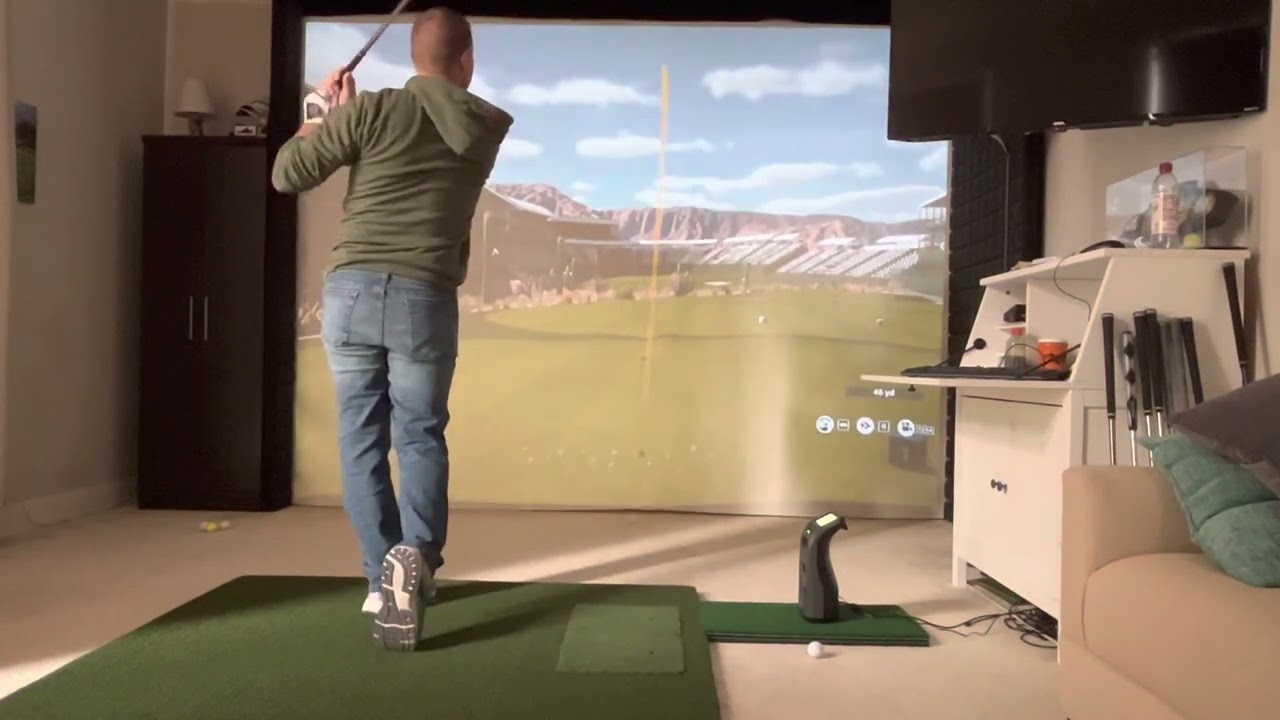
                      Latest update shown in the video:
                      - Roku TV hung with a reticulating mount
                      - Bushnell Launch Pro

                       
                      Last edited by Godfather; 12-24-2022, 03:47 PM.

                      Comment

                    Working...
                    X