Announcement

Collapse
No announcement yet.

Video recording software - Kinovea - it's awesome

Collapse
X
 
  • Filter
  • Time
  • Show
Clear All
new posts

  • Video recording software - Kinovea - it's awesome

    Hi guy

    Just wanted to shout out to Kinovea as a GREAT program to do video replay. I use IDS uEye cameras with Skytrak + TGC and it's awesome.

    I've used MotionView, V1, Swinguru Pro, Trackman TPS and other software... this is awesome and FREE!!
    [url]http://www.24-7.golf[/url]
    AUS: +61390057975
    USA : +14698449353
    Flightscope and SkyTrak Distributor

  • #31
    Originally posted by inorkuo View Post
    I went ahead and ordered this camera. Its coming from China so it'll be a while before I can try it. Claims to do 120fps at 640x480.

    http://www.ebay.com/itm/321951474828...%3AMEBIDX%3AIT

    Guys I bought this camera and was delivered a few days ago. Hooked up to the PC and Kinovea picked it up instantly! Works great!! This is in stark contrast to uEye cameras which I have used for years but they are ALWAYS breaking down... their USB interface is disgusting... used them for 6 years had over 20 cameras and sold most of them as they piss me off to no end. I'll be ordering 12 of these cameras for my shops this week! Great find!!!
    [url]http://www.24-7.golf[/url]
    AUS: +61390057975
    USA : +14698449353
    Flightscope and SkyTrak Distributor

    Comment


    • Sascha1818
      Sascha1818 commented
      Editing a comment
      Igor would you mind posting a Video of it ? I saw they have the same camera with a varifocal lens 2.8 - 12mm which i would probably buy since I'm not sure what lens to get with the distance I have.

    • FaultyClubs
      FaultyClubs commented
      Editing a comment
      If you like it that's all that matters, but personally I've always considered it a poorly designed camera. Limited dynamic range, heavy filtering smearing most detail, strange exposure settings and not quite truthful fps. It is better than a ps3eye camera in some ways and worse in others. The attraction over the ps3eye is a little faster fps at 640x480 or a little clearer picture at 720p if one is ok running slower than ps3eye. Needs a lot of light though for good frame rates. It would be interesting to hear what other people think given its strengths and weaknesses.

      Sascha: 2.8 might not be wide enough for you depending on your distance and which resolution mode you decide to use, so don't buy the zoom expecting you'll be "for sure" covered. Best to figure it out beforehand.
      Last edited by FaultyClubs; 01-25-2017, 04:21 AM.

  • #32
    Hey guys you are right about the lens... sorry I actually bought this camera: http://www.ebay.com.au/itm/222144518...%3AMEBIDX%3AIT

    I need to widen the lens it's too narrow - I used 2.2mm on my uEye so may be need to find another lens or some solution. But the best thing it just worked as soon as you plug in! I wanted to burn those uEye cameras they're so fickle. That's why I bought one only to test.... so need to figure a few things out and yes the fps was a bit under - something like 28fps on 30 setting. In regard to light I have $800 lights above each hitting position in my stores so the lighting seems OK... when I switch them off yes it's a bit crappy.
    [url]http://www.24-7.golf[/url]
    AUS: +61390057975
    USA : +14698449353
    Flightscope and SkyTrak Distributor

    Comment


    • #33
      Haha you're right, getting a camera that actually works when you plug it in is a big step in this industry it seems. The next step is to have it work well...and there it is a bit challenged especially for the higher speed modes.

      For your lens, make sure it is going fully wide open. If you have focus travel left over then it can go wider if you screw the lens further into the mount (until in focus at maximum focus setting). You might find it was deliberately hiding excess barrel distortion though.

      Comment


      • #34
        OK played around with it and opened up the lens - it's good now. Video seems to work well. I did some swing videos today, will do a few more and upload tonight (my time).
        [url]http://www.24-7.golf[/url]
        AUS: +61390057975
        USA : +14698449353
        Flightscope and SkyTrak Distributor

        Comment


        • Sascha1818
          Sascha1818 commented
          Editing a comment
          Nice, I'm near Sidney right now. Happy Australia day !

        • Igor-247-golf
          Igor-247-golf commented
          Editing a comment
          Ha! Awesome!

        • Sascha1818
          Sascha1818 commented
          Editing a comment
          Hey Igor, could you upload some swing Videos where you used the new cam ? Kinda ready to order it, just wanna make sure it works good. I might get back to you later too for some instructions how to set everything up if that is ok with you. I'm ok with Computers but not really great. Would like to get the same Setup with automatic recording and replay in slowmo.

      • #35
        Hi, sorry it took a while. Here are two videos - it's weird it's a bit sped up but captured at 98fps (not 120).


        [url]http://www.24-7.golf[/url]
        AUS: +61390057975
        USA : +14698449353
        Flightscope and SkyTrak Distributor

        Comment


        • #36
          Originally posted by Igor-247-golf View Post
          .... it's weird it's a bit sped up but captured at 98fps
          That's what happens when it claims 120 frames per second but only outputs 98 frames in that time frame.

          The playback software only knows what it is told and it is told 120 fps. So instead of playing back 98 frames every second it plays back 120 frames each second resulting in a sped up playback.

          That ratio is the speed up factor so you can slow the file down by that amount to get back to normal speed. Or some programs allow you to override what the file claims and put in the actual frame rate. Latest experimental version of Kinovea does that. ..just tell it to playback at 98 fps and it'll be normal speed.

          Your lighting looks good. Curious what kind and how much light?

          EDIT: For a bit of trivia...this is why those old b&w silent films look sped up. They were typically recorded at 16 fps but today's film assumes 24 frames each second.
          Last edited by FaultyClubs; 02-07-2017, 06:03 PM.

          Comment


          • #37
            Interesting point re B&W films! I never knew that

            These are the lights I use - 2 in the venue... not cheap! $800ea


            But they're self adjusting and come with a remote control.

            Originally posted by FaultyClubs View Post

            That's what happens when it claims 120 frames per second but only outputs 98 frames in that time frame.

            The playback software only knows what it is told and it is told 120 fps. So instead of playing back 98 frames every second it plays back 120 frames each second resulting in a sped up playback.

            That ratio is the speed up factor so you can slow the file down by that amount to get back to normal speed. Or some programs allow you to override what the file claims and put in the actual frame rate. Latest experimental version of Kinovea does that. ..just tell it to playback at 98 fps and it'll be normal speed.

            Your lighting looks good. Curious what kind and how much light?

            EDIT: For a bit of trivia...this is why those old b&w silent films look sped up. They were typically recorded at 16 fps but today's film assumes 24 frames each second.
            [url]http://www.24-7.golf[/url]
            AUS: +61390057975
            USA : +14698449353
            Flightscope and SkyTrak Distributor

            Comment


            • #38
              Weren't a few of you guys ordering this camera?

              Does everyone get 99 fps instead of the advertised 120fps? Or some do and others don't? I wonder since mine actually does 120 fps.

              Comment


              • FaultyClubs
                FaultyClubs commented
                Editing a comment
                No, its not limited to 100 fps.

              • inorkuo
                inorkuo commented
                Editing a comment
                in kinovea the camera is set to 640x480 at 120fps but when i count the frames i count 99. when i set exposure manually to brighten the image, the fps drops so i've left it at auto. i'll try setting everything back to default and see what happens. i want my missing 21fps...

              • p3eps
                p3eps commented
                Editing a comment
                If you use the software they supply with it, it outputs 120fps. It's essentially just a viewer, that doesn't really do anything else.

            • #39
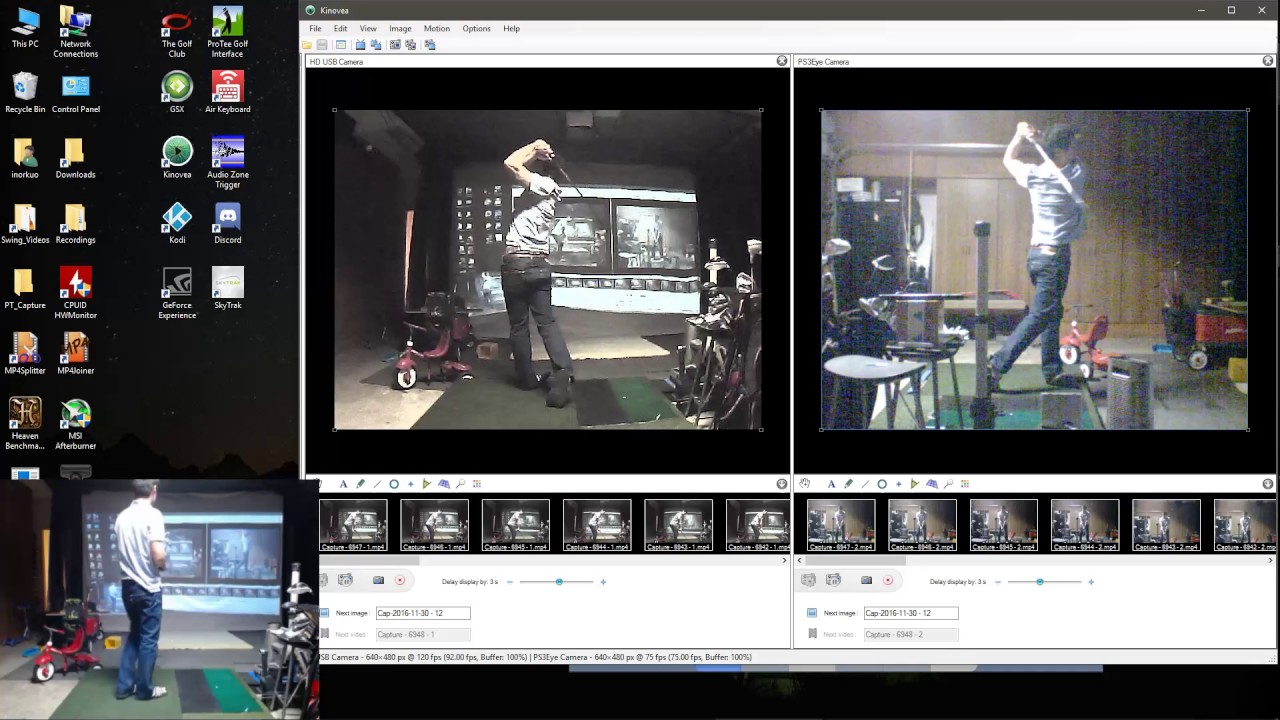
              Has anyone been able to get Kinovea to automatically record two camera angles at the same time (in an automated way)?

              Comment


              • goatbarn
                goatbarn commented
                Editing a comment
                Let me know if you can figure out the dual capture/replay...I've messed with it a little bit but could never figure out the hotkeys to get both windows capturing at same time. It'd be easiest if I could figure out how to run two instances of kinovea at the same time, but I didn't have time to look into that yet.

              • jrz
                jrz commented
                Editing a comment
                Still waiting for inorkuo to share his dual camera script :-)

              • inorkuo
                inorkuo commented
                Editing a comment
                sorry i forgot. will post it later today.

            • #40
              So I'm pretty close to a wall on my front side, probably only about 3 feet. Do I have any options to get a reasonably priced USB camera that could capture my full swing from that distance?

              Comment


              • #41
                Originally posted by Zevon View Post
                So I'm pretty close to a wall on my front side, probably only about 3 feet. Do I have any options to get a reasonably priced USB camera that could capture my full swing from that distance?
                Not without serious fisheye
                [url]http://www.24-7.golf[/url]
                AUS: +61390057975
                USA : +14698449353
                Flightscope and SkyTrak Distributor

                Comment


                • #42
                  for everyone who is wanting to do dual capture, i've attached a zip file that includes the files recording_dual.au3 and DotNetIdentification.au3. recording_dual.au3 will start and stop the recording and that's it. i commented out everything else. DotNetIdentification.au3 is a modified version that you need to drop into "C:\Program Files (x86)\AutoIt3\Include" directory. without it, the recording script won't compile.

                  if you are using ps3eye cameras, there really is no good way to switch from dual capture to dual playback then back to dual capture in kinovea. i have one of those 120fps usb cameras from china and a ps3eye camera and a possibility with that combination is to go from dual capture, to capture/playback and then back to dual capture. that could work to play the dtl recording and then switch to the fo capture but still not great imo. another solution might be to use a separate application to play back the recordings in slow motion side by side so that you can leave kinovea in dual capture mode. does anyone know if you can run the newest version of kinovea along side an older version? i'm going to try to make some time this weekend to work on this but if someone else can figure it out first, please share.
                  Attached Files

                  Comment


                  • goatbarn
                    goatbarn commented
                    Editing a comment
                    VLC would work for a separate program to playback in slow mo, multiple instances can be run at same time. I'm afraid of all the programs grabbing a certain amount of memory upon opening, that it may be very laggy within tgc tho...

                  • bogeyfree
                    bogeyfree commented
                    Editing a comment
                    Inorkuo
                    Thanks for sharing

                • #43
                  based on goatbarn's suggestion i made some good progress on dual recording and playback. there are still a few things i'd like to clean up but i've uploaded a teaser video.


                  vlc is pretty light weight but it does require a beefy computer to run kinovea in dual capture mode with max delay and tgc at the same time.

                  Comment


                  • FaultyClubs
                    FaultyClubs commented
                    Editing a comment
                    Inor: It's hard to know what is happening without being there.

                    Some questions: First, does the app actually count frames received and show that value? If yes, how did you determine that and what are the exact values you are getting in the app? If it just says 120 fps then it is not counting frames. If it is reporting constantly changing fractional numbers like 118.5, 119.2, 121.1 etc it probably is but would need to be verified to be certain.

                    Second, what do you mean when the file is opened in kinovea you count 120 fps? Play back software only knows what the file claims and plays back at that rate. So kinovea will always play frames at 120 fps. The issue becomes whether payback time is running at correct speeds or not. How did you determine that?

                    Since these cameras are uvc compliant kinovea should be getting it right when it claims only 99 fps. I find it hard to believe otherwise...but it isn't impossible so am interested in your investigations.

                  • inorkuo
                    inorkuo commented
                    Editing a comment
                    the app called AMCAP and i didn't notice until you mentioned it but it does display captured frames, time, and dropped frames. it looks to be recording at around 99 or 100 fps. when i right click the video file and go to properties, windows is saying that the file is 120fps. when i open the file in kinovea, i click frame by frame and count 120 clicks for 1 second. if i use the same camera and record in kinovea, and click frame by frame, i only get 99 clicks for each second. i'm not sure if i have a playback speed problem. i always playback in slow motion but i can check it tonight. so it looks like the advertised specs of the camera are false and it does not do 120fps at 640x480.

                  • p3eps
                    p3eps commented
                    Editing a comment
                    That may be why they can only make me a defaul 100fps camera and not a 120fps? Maybe it doesn't actually do 120fps at all.

                • #44
                  I've attached the exe that does dual recording and playback. also included are the au3 files for anyone who wants to mess around with the script. this works on Kinovea version 0.8.15. As previously mentioned, kinovea in dual capture requires a significant amount of memory. i have not tried running this along with tgc but it probably won't work well except on higher end machines.

                  The script requires Kinovea to be open in dual capture mode. File naming must
                  be set to "Free text with automatic counter" and formatted as a string followed
                  by a "-" then a number, i.e. "Capture - 101". VLC must be set to allow multiple
                  instances and to not show in the system tray. also uncheck "resize interface to video size".

                  There are 8 parameters that need to be passed to the script.

                  1 - delay before start of recording (default = 0 seconds)
                  2 - total length of recording (default = 3.5 seconds)
                  3 - wait for recording files to be created (default = 0.3 seconds)
                  4 - wait for VLC to load (default = 0.5 seconds)
                  5 - delay before switching back to TGC (default = 0 seconds)
                  6 - playback speed. 1-10 where 1 = 10% and 10 = 100% playback speed (default = 2)
                  7 - file format (default = mp4)
                  8 - kinovea recordings directory (default = D:\Swing_Videos)
                  Attached Files
                  Last edited by inorkuo; 02-19-2017, 11:03 PM.

                  Comment


                  • #45
                    i played a few holes with kinovea running in dual capture mode and it was ok except that the delay setting in kinovea started to slide. when i first start up kinovea i put in a 3 second delay and i'm able to capture my swing from start to finish with a little padding before and after. after about 3 holes, the captures would start mid back swing. by the end of the 6th hole, the capture started at the top of my back swing. i'm running an i7 3.4gz cpu with 8gb of ram and an nvidia gtx970 gpu. the os and program files are on an ssd. my recordings write to a 7200rpm notebook hard drive. cpu usage hovers around 50%, ram 55% and gpu 80%. any ideas on why this is happening? do i need more ram?

                    Comment

                    Working...
                    X