Announcement

Collapse
No announcement yet.

No sound through hdmi using tgc

Collapse
X
 
  • Filter
  • Time
  • Show
Clear All
new posts

  • No sound through hdmi using tgc

    I have an Msi notebook with gtx1070 card
    i can get sound in Tgc when just using the notebook without the projector connected
    With the projector connected I can get sound using apps other than Tgc but get no sound when using tgc

    right click on speaker icon and looking at sound mixer all volume is set to max
    sound settings in Tgc are set to 100
    soubd tests work on PC speakers and projector speakers

    playback device for projector via hdmi seems to be through nvidia output
    tgc audio seems to be directed through Realtek digital output
    guessing this is or is contributing to the issue but not finding anything on-line on how to resolve

    looking for any help/advice to resolve because guessing I will have similar challenges (no sound) if I try and use audio receiver in the future rather than the projector given current issue

    thanks
  • #2
    I'm not an expert, but I can tell you that when I play through the projector, and I switch to hdmi 2 which is the PC (hdmi is amazon firestick in my setup), it takes a full minute for the sound to come in. It drove me crazy in the beginning. I usually start everything at the same time and by the time TGC loads, I pick my course and get to the tee box, the sound will come on. I usually get no sound during the TGC startup screens, etc. Now, if I restart TGC I will get all the sounds from the opening screens, etc. but from a cold start, it takes a minute or two before the sound comes on.....not sure if that is your problem, but I would make sure you are giving it a minute or two to load in

    Comment


    • #3
      Thanks for feedback
      we were trying placement positions recently for mounting the protector while Tgc was started so one or two minute delay does not seem to be the issue.
      One thing I meant to try today but forgot was to try using a different hdmi cable. I will try this tomorrow

      Comment


      • #4
        Its not the cable. If you are getting video you are also getting audio.

        Left-click on speaker icon in taskbar, this allows you to select output device. The projector should show up. I also have a 1070 and when my projector is on it does not say NVidia as the output device, it says "BENQ" or something like that.

        You need to select output device before you launch TGC.

        All this happens automatically for me. When I turn on the projector, it becomes the default output device. Hopefully once you get this selected, you will also not have to select it each time.

        Comment


        • #5
          Thanks
          i have similar playback device named for the projector - GT1080 - and a playback device for internal speakers
          both are enabled at start up before launching tgc and there is no sound
          if I disable internal speakers before launching Tgc, so GT1080 is only device enabled, still get no sound from projector

          Comment


          • #6
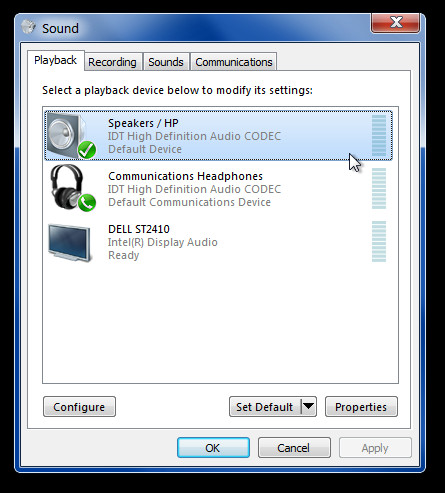
            Found this win7 tip that worked for me on win10 as well
            Learn how to play audio through HDMI and speakers simultaneously. Get rid of the annoyance of constantly switching between sound devices.

            Comment

            Working...
            X