Announcement

Collapse
No announcement yet.

Best projector with horizontal offset

Collapse
X
 
  • Filter
  • Time
  • Show
Clear All
new posts

  • Best projector with horizontal offset

    Would love to go with Optoma 1080/1090 or Benq (They seem to get great reviews on here), but they dont seem to have horizontal offset. I have a 10 feet wide hitting area and I am reading that best place to put the projector is above the ball. I figure that the projector is going to be 1-2 feet offset at that. Any recommendations for a projector that can do that. I think Epson Home Cinema 1060 can do it. Any others ?.
    Or should I scrap the idea of trying to find a projector with Horizontal offset. (Does it lose too much of the image quality) and look at floor mounting or mounting well behind the hitting area ?
    Last edited by GolferChris; 11-06-2020, 11:13 AM.

  • #2
    I have the optoma eh200st that is recommended by rain or shine golf and like it. and it has horizontal adjustment ... meaning I can shift the image left and right. Also has zoom and keystone correction.

    Comment


    • GolferChris
      GolferChris commented
      Editing a comment
      Thanks Brian. That projector looks like it might be too much short throw for me. The problem I have is that I only have 10 feet wide space and 9 feet high ceilings. I will be standing offset. I have a 3 metre wide screen so this projector would be 1.5 metres (1.5 metres from screen) in front of me and the ball.. That might mean that the projector is in harms way (Being in the way of shots that go very high and/or the club path follow through with driver. Its a pity because it looks like a good projector.

  • #3
    Well there is zoom in and out that can adjust for that. You could move it a bit further away and zoom in. But probably a bit risky. If you do want to try it amazon has it for cheaper than rain or shine golf ... and I know returns with amazon are pretty easy.

    Comment


    • #4
      If you can find a BenQ HT1075ST (discontinued but shows up on eBay regularly for around $500), it has excellent horizontal keystone adjustment with virtually no image degradation. Avoid the Optoma EH460ST, I've been generally unhappy with its V and H keystone adjustments (really degrades the image quality, and the horizontal adjustment doesn't go very far - cannot have projector all the way to the right or left edge of the screen).
      - Ron at GunghoGolf.com - we specialize in TrackMan, FlightScope, Foresight, Uneekor, SkyTrak, Garmin, Bushnell, TGC, and E6 Connect. 512-861-4151 or email hello AT gunghogolf.com.

      Comment


      • #5
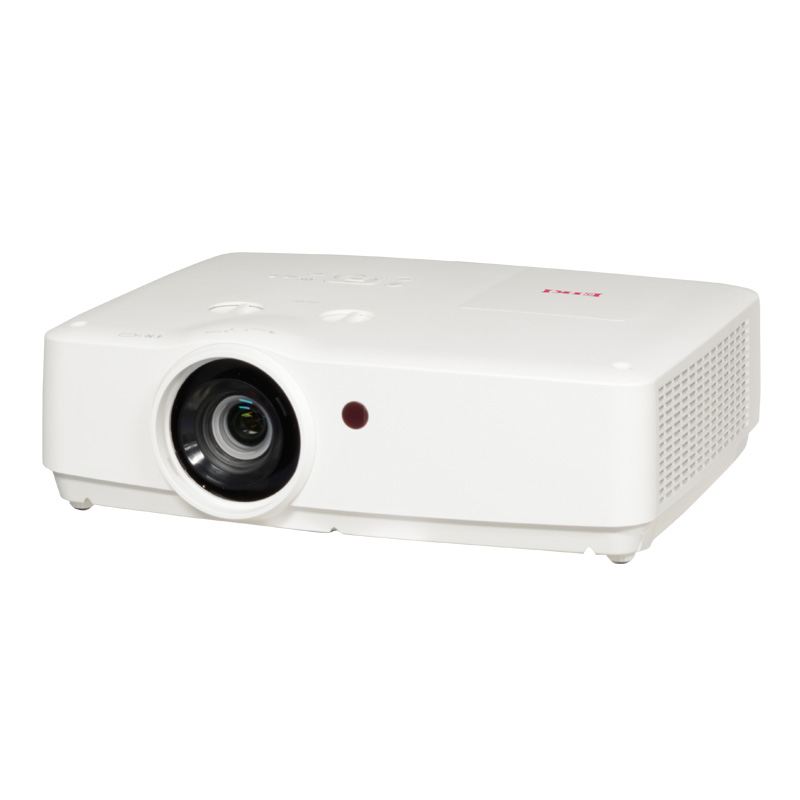
        I believe this is the projector Foresight uses for "Sim in a Box". Foresight actually designed the system assuming the projector sits on a computer stand to the right of the golfer. Should provide enough lens shift (7%) and is definitely not a short-throw projector. Hope this helps.
        EK-308U WUXGA 3LCD, High Performance, Portable projector with 6000 ANSI lumens and 10,000:1 contrast ratio for business and education

        Comment


        • GolferChris
          GolferChris commented
          Editing a comment
          That is one really flexible and powerful looking projector - 6000 lumen, multiple aspect options, lens shift and a big digital zoom.

        • Carl Johnson
          Carl Johnson commented
          Editing a comment
          Chris, I have seen it at the PGA Show - impressive Lumens. If you post that model number on this forum, my guess is a few guys will reply. Pretty sure I've seen a few people post via Sim in a Box reviews and/or they bought the projector outright - like you are looking to do. It is not short throw enough for my application (I need near .8 throw), otherwise I would have purchased one already! Not sure about the response times (lag) with games but that only applies if you plan on playing games like Fortnite, Call of Duty, etc. on your SIM.

        • GungHoGolf
          GungHoGolf commented
          Editing a comment
          That's a nice projector, but the throw is on the longer side - just something to think about if you plan to ceiling mount on the center line with a big screen - shadows could come into play. It's great for off-center placement, though.

      • #6
        I have it. It is actually very nice and very flexible. It is not short throw and is mounte at 14 feet for a 12x8 screen. Panasonic has a very similar projector fir 1199

        Comment


        • #7
          Thanks all. Can I use the digital Zoom to vary the throw ?. I don't need it to be very short throw. My screen is 9 feet wide and I plan on hitting balls from 9 feet to the screen. The projector will ideally be either 9 feet from the screen (and offset as I only have 10 feet wide hitting area) or it will be 12-13 feet from the screen and centred. (Far enough back to be out of the way, but not far enough back to cause too much of an issue with shadow). I think this projector will let me do either (The beauty of lens shift, keystone and zoom) - Is that correct ?.
          I appreciate all your help.

          Comment


          • #8
            I would suggest putting both projectors into the calculator on projector central and play around with the zoom feature there to see what might be possible from your desired distances. Also check brightness to ensure they will be bright enough at that distance.

            if the projector has lens shift, then that is great for moving an image around more and then you can use the keystone for the minor corrections. Some projectors also have a corner adjust feature to fine tune your corners. I would also suggest not maxing out the zoom as you will want some wiggle room just in case you are off by a little.

            Comment


            • #9
              Have you had a loot at the WU515ST

              Comment

              Working...
              X