Announcement

Collapse
No announcement yet.

Any interest in a true sim society?

Collapse
X
 
  • Filter
  • Time
  • Show
Clear All
new posts

  • Any interest in a true sim society?

    I can set something up with

    No Boost
    No gimmies or 3 foot gimmies if we can do that as 6 feet is just way too long.
    No straight putting patch
    Wind turned on
    visual clues on screen would be mini map and the flagstick with distance on it.

    I'd use all the LIDAR courses from here and TGC tours site along with some of the top rated fantasy courses after I test them out in steam to make sure they look playable on sim.

    Anyone interested ? If we can get a bunch of people I'll set it up.

  • #2
    Yes. Sounds good.

    Comment


    • #3
      So no skytrak players because they would get screwed with no straight putting and short putts.

      Comment


      • Jwheels9876
        Jwheels9876 commented
        Editing a comment
        Guess not..........

    • #4
      What are you referencing when you say “visual clues on screen would be mini map and the flagstick with distance on it.”

      are there other visual clues that can used besides these two things? This sounds standard but not sure if I’m missing something.
      -KillaCale8

      Comment


      • #5
        Sounds interesting, I still think I’d go with 3 foot gimmies though. Using 6 foot gimmies I average about 2 putts per round less than in real golf, so thinking 3 feet would be just right.
        Last edited by Cklguy2013; 01-06-2020, 03:11 PM.

        Comment


        • #6
          Am I missing something, I putt with my Skytrak, off a fibre built to boot and it’s perfectly fine. Almost always right on the line I pick with good distance control? No straight putting patch on, whatever that is.

          Comment


          • calebm1001
            calebm1001 commented
            Editing a comment
            Check your setting files. If you’ve never experienced a bad time putting, your setting most likely has it turned on already.

        • #7
          calebm1001 Interesting, I’ll have to check. Is this a setting that is on by default, because I’ve changed zero settings since downloading from Protee a few months ago. I certainly have no issues with erratic putting behaviour.

          Comment


          • calebm1001
            calebm1001 commented
            Editing a comment
            I’m not exactly sure but I believe so. When originally purchased and downloaded it was not automatically set to ON. Recently, I had to redownload and install and it was already set to ON. I assume it is bc putting on SkyTrak within 10’ without the patch is messed up, hence the patch implementation.

          • Dewey
            Dewey commented
            Editing a comment
            Can someone let me know what the straight putting patch is? And what does it do exactly?

          • Jwheels9876
            Jwheels9876 commented
            Editing a comment
            It makes every putt go straight. You can aim at your side wall a d as long as you get the speed right, the putt will go in on a putt with no break. It's pretty ridiculous but I guess it's there for people who own launch monitors that don't read putts well.

        • #8
          calebm1001

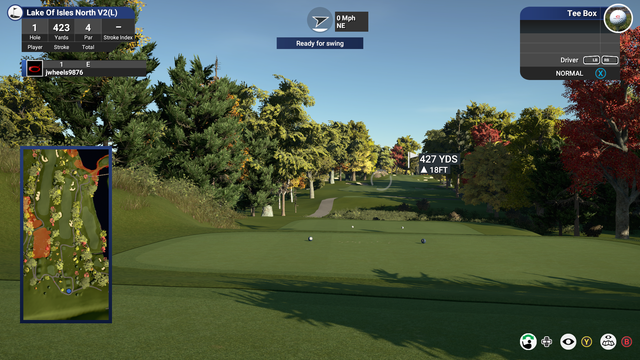
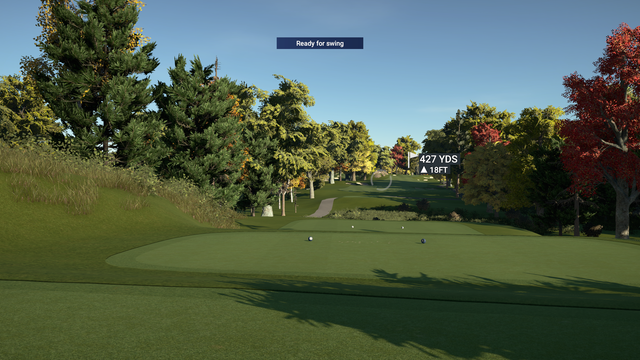
          here is normal

          here is everything after a few seconds with everything in the display/HUD set to fade.

          I f I could get rid of the Ready to hit thing I would have a nice clean view of just the course in front of me. I like it being like I'm out there. you get a few seconds to check your lie and the wind and set you aim on the map. You can always hit Q to bring it all back up also for a second look or to aim again.

          Comment


          • calebm1001
            calebm1001 commented
            Editing a comment
            I see! I loved playing in this view but I hated not being able to pull this information back up. The fade seemed super quick and if it wasn’t paying attention I would easily miss it.

            Is there a way to get it back on the screen for another glance?

          • Jwheels9876
            Jwheels9876 commented
            Editing a comment
            Yeah it moves a little quick sometimes to read everything and aim on the map so I just hit Q quick twice to get everything back up if I need to

          • Lynchdpm
            Lynchdpm commented
            Editing a comment
            Many have complained. Still unsure why they will not remove "ready to swing". They put tremendous effort into amazing graphics and we have to stare at "ready to swing" plastered across the sky

        • #9
          Good idea, but I think it's only working with Uneekor users. Straight putt off is on GC2 more forgiving than Uneekor, I think +-2 degreees? With Uneekor you have 0.1 degrees.

          No gimmies.

          Comment


          • #10
            Call it the no skytrak no sensors society. I'd love to play if 18 holes. Safe to assume no setting adjustment at all and no rewinds?
            My Courses:
            World Par 3's by mthunt
            Toronto GC (L) mthunt
            Burlington G&CC by mthunt
            Weston G&CC by mthunt
            London Hunt Club L mthunt
            Park CC Lidar mthunt
            Sunningdale GC Robinson L
            Sunningdale GC Thompson L
            Muirfield Village (liDAR) First Ever Lidar course
            Country Club of Castle Pines (liDAR)
            The Sanctuary GC ProTee L
            The National GC L mthunt
            Mississaugua GC L mthunt
            Shaughnessy G&CC L mthunt
            Markland Woods CC mthunt
            Hidden Lake Old L mthunt
            Magna GC L mthunt
            Barrie CC L mthunt
            mthunt Range

            Comment


            • JackedUpSwing
              JackedUpSwing commented
              Editing a comment
              It would be harder for GC2 not easier... GC2 has a +/- 1 degree error so a putt from 10 feet could miss even if you hit a perfect putt.

            • Jwheels9876
              Jwheels9876 commented
              Editing a comment
              I never had any issues with GC2 with straight putting turned off. Give it a try in a practice round with 3 foot gimmies and see how it works out.

            • mthunt
              mthunt commented
              Editing a comment
              I have no issues on 1 foot putts with a GC2.

          • #11
            calebm1001 JackedUpSwing This is very easy to see just how bad either the skytrak or gc2 can be at reading putts. Tape two alignment sticks together and then start hitting putts down the alignment stick groove. The ball goes dead straight. Hit putts that go 3', 5', 7', 10' and 15' . Hit about 5 shots each and make sure to only use data that matches those distances and see what readings you get. You may see that skytrak has difficulties picking up 3' putts and the HLA is all over the map. The GC2 is definitely better by design. It takes many more pictures and as such has tighter tolerances. IMO skytrak wasn't even intended for putting, it was added way after launch and it is limited by the hardware design.

            Comment


            • #12
              OK I put up a society called True Sim Society. 3 days or so test run to see what people think. I choose a fantasy course but it is absolutely gorgeous. 6300 yards or so.

              Settings:
              NO BOOST!!
              Set Straight Putts to OFF
              NO GSX adjustments at all.

              Set GIMMIES to 1YD === 3 Feet

              In game set your On screen items to Fade in all categories.

              I am open to setting the putt thing to on I guess if people can't putt but Uneekor people don't have any options like that.

              If you stream, post the link here so people can see what the results look like

              There is wind so make sure you have the wind meter set to fade also so you van see the wind before the shot

              Comment


              • #13

                Comment


                • #14
                  So, what am I missing with making all the visuals fade. That stuff really gives no advantage at all?

                  Comment


                  • Jwheels9876
                    Jwheels9876 commented
                    Editing a comment
                    nothing besides it looks more realistic. You can bring it back up if you need it or play with it on IDC. I just think it looks much better than a cluttered screen does

                • #15
                  How will you know people aren't boosting though?

                  Comment


                  • mthunt
                    mthunt commented
                    Editing a comment
                    Great question. How will you know wheels?

                  • Jwheels9876
                    Jwheels9876 commented
                    Editing a comment
                    Well I guess I'm just hoping people can police themselves.

                  • mthunt
                    mthunt commented
                    Editing a comment
                    Good luck with that wheels.
                Working...
                X