
Isn’t today yesterday’s tomorrow.... lol
-
-
Will this update have any impact or issues with TGC2019? I don’t use the Skytrak range that often and don’t want to mess up TGC2019Comment
-
Welcome back, Seth. Thanks for sharing the great news.
I will take any improvement. I did note that while most issues said "fixed" this one says "improvement". Probably safer to call it that, but I truly hope it brings low ball speed level accuracy into the higher ball speed range.- Improvements to high ball speed measurements (150mph+).
Who has a TM/FS/GC2/Quad and high ball speed to boot so they can test for us?
Comment
-
Great to have you back Seth! Excited to test out the ball speed improvements.. really glad it made the cut.
Same issue mentioned earlier. I didn't receive any error about my database dropping, however definitely noticing some gaps in the history. I only seem to have 2019 dates, data synced check mark is checked. In the app I have 2 pages of 2019 practice entries, on SkyGolf website I have 41 practice sessions for 2019 so that should be 5 pages. So its only a subsection of that year and nothing from 2020/etc. I did back up my etrgolf.db so if you want me to try something with it let me know (put it back and see if it restores the history?).
Also minor thing: I am currently offered "page 2" on my Challenges tab, but when I click next it is blank. Probably somewhat related to the missing entries Id guess. Screenshot attached.
[edit] New find: Trouble dragging clubs into the bag when I got to 12. The last two wont respond to drag and drop. Seemed to get a little laggy. I eventually got them in by really holding down the click before moving (previously they were all just quick flicks), but it didnt save and when I went back in I was at 12 in the bag again. I can record this if its helpful.Attached FilesLast edited by Celeras; 03-03-2020, 08:10 AM.Comment
-
Thanks for the feedback! To me, it sounds like it may just need a little more time to sync. Try closing and re-opening again. As far as the club dragging, you definitely need to hold down the click on a club along the bottom, drag it to an empty spot above, see the spot highlight green, and then release the click. Can't go too fast
-
Try relaunching the app and see if the sync goes through. If not, let me know. We are monitoring your account and don't see any errors. Also, try hitting a few shots in practice on the new version and see if those new shots sync to the cloud.
-
-
Downloaded and updated. Just wondering what happened to the club head data that they were originally going to add in ... is that there?
Also, my data synced notification, is showing a no entry sign ... any idea? - scratch the last bit, just rebooted, gone back in and it is syncing now
Attached FilesLast edited by Albie999; 03-03-2020, 10:15 AM.Comment
-
-
What do I need to download for my laptop 32 or 64 bit version ??
ThanksComment
-
Right Click on your windows start button and select "System" that will bring this "About" window up... You are more than likely running a 64 bit.
Attached FilesComment
-
-
Anyone with ball speeds over 150 mph try out the update yet?Comment
-
-
Great to see an update - will try it out tonight.
SkyTrak_Seth I appreciate you will likely not have a definitive answer, but now this version is out there, do you expect the next version (improved graphics etc) to be hot on its heels?Comment
-
I certainly don't have a definitive answer on timing, but my plan is to do a follow-up release to this one with small fixes and then follow that up with 4.0.Comment
-
SkyTrak_Seth is there any list of tests that the community can perform to help expedite the process? Definitely glad to have these fixes, and would certainly love to see them in TGC2019 ASAP.Comment
-
Just need to make sure that everything works properly with the multi-user support and bag management before launching this release publicly. But regarding the question about TGC, it would be nice to have the high ball speed fix validated as it looks like several users have already done. That's the only piece of this that will carry over to TGC and other sim partners. -
I played a few rounds in TGC last night. Ball on most shots seem to carry the same as before. I would say though it seemed to report a lower ball speed in TGC and estimated Swing Speed than in the ST Range. Not sure if that is a setting in tgc that is effecting that. I kept wind conditions to none -
I got inundated with chores last night, and didn't get to play unfortunately. I did however install the update. Gave me the Database error GungHo documented. I couldn't hear the commentary so I don't know what the fix is yet. Will try to crank it up tonight! haha
I did get into the program after that, and verified that only a few of my stats remained. Just a session from the other day I think was left.
The only other issue I had was "grabbing" the club I had selected in My Bag and putting it into the bag. I'd have to click on it 3-5 times to get it to move. That was for every club. Perhaps the 'grab zone' is too small?
More testing tonight hopefully!
-
-
-
Hit 5 shots with driver with ball speed between 164-166. Updated. 5 more with ball speed between 167-169.
same ball, same driver, same crappy swingComment
-
JackedUpSwing - he said in this post he went from 164-166 to 167-169 with the update.
-
-
SkyTrak_Seth It's been a few hours without any additional history populating, but I will keep an eye on it if you think that is the issue. For what its worth I do get the "Data Syncing" hourglass every time I load the app, but it never brings anything.
Regarding the bag, I believe this is a genuine bug and not user error related to how long I held the click. Please see the attached video and note the Sand Wedge. I hold it for a very long time and it takes a while to grab it. And it actually finally does so on a fast click. It's a little flukey. It did save them this time though so I don't have to do it again.
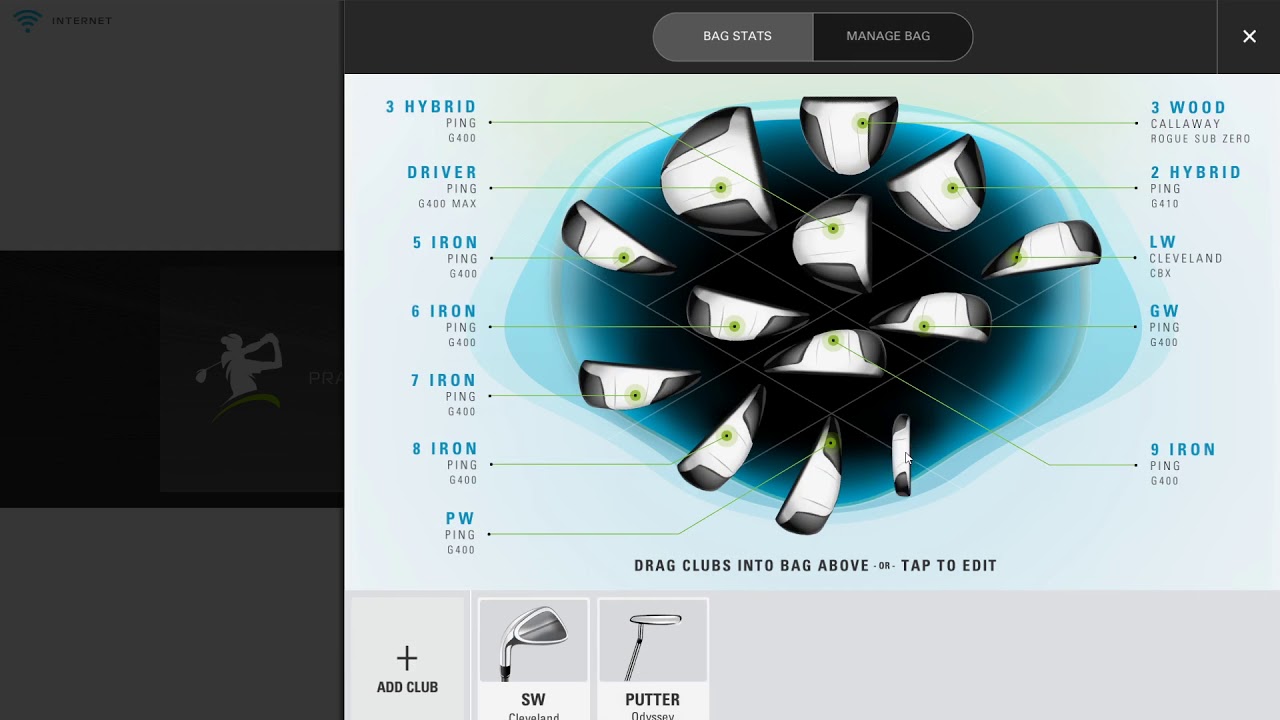
Q&A is actually part of my job so if you have any additional instructions you want to throw my way feel free. Happy to help.Last edited by Celeras; 03-03-2020, 07:54 PM.Comment
-
See what happens if you try dragging the clubs from the bottom row more "up" first instead of diagonal right. I think it might be thinking you are trying to initially reorder them along the bottom. -
SkyTrak_Seth Nailed it, that helps a lot. Still have to hold the click a little longer sometimes but can get it every time going directly upwards. -
Glad to hear! Maybe we need to rethink the "drop zone" so it is more obvious. I actually submitted a ticket to allow for shuffling clubs along that bottom row...I hope that will result in finding a good system to differentiate shuffling vs pulling clubs up into the bag. Stay tuned.
-


Comment