Announcement

Collapse
No announcement yet.

SkyTrak and The Golf Club (TGC) Simulation Software

Collapse
This topic is closed.
X
This is a sticky topic.
X
X
 
  • Filter
  • Time
  • Show
Clear All
new posts

  • SkyTrak and The Golf Club (TGC) Simulation Software

    Hi Seth. I'm new to this forum but have been reading as much as I can about SkyTrak on this and other forums. It seems that many experienced sim users think that The Golf Club game is the best simulator software out there right now. In fact, if I'm understanding and remembering things correctly, Bubba22 and Zmax were instrumental (please correct me if I'm wrong) in getting ProTee to integrate their sim hardware (and gc2) with The Golf Club software. So my question to you/SkyTrak is simply this: Has there been any thought to integrating SkyTrak with The Golf Club? And if so, what are the odds that this might happen? And if so, when?

  • First of all, glad to see that seems like the ST/TGC release has been quite successful and smooth - agree that the few bugs that have appeared (and some seem to have magically corrected themselves for many) is quite acceptable for a new release.

    Originally posted by leonardchiu View Post
    the sim experience is pretty darn close to the real thing. Even the scores are close.
    Apologized if this has been asked and answered before, but does TGC (as well as other sims like E6, PG and even WGT) adjusts (i.e., penalizes) for bad lies, rough, sand or bushes - i.e., maybe reduce ball speed to account for drag coming out of roughs or bushes, or spin when hitting off slopes? As I would think one's sim scores would be lower if can hit out of the rough or bushes on a mat w/o any penalty.

    Comment


    • Sascha1818
      Sascha1818 commented
      Editing a comment
      Is it the penalties it is showing in the corner of the screen right next to the lie ? If it says 40-60% how does it choose if it is 40 or 55 or 60 ?

    • ProTee United
      ProTee United commented
      Editing a comment
      Yes and no. The values showing there are random, but actually we are using fixed values so its a little easier to learn.

    • Sascha1818
      Sascha1818 commented
      Editing a comment
      What would that values be ?

  • Searched TGC penalties

    http://golfsimulatorforum.com/forum/...stem-explained

    The bottom line is you get the hang of it pretty quickly.
    Last edited by mthunt; 02-26-2016, 01:25 PM.
    My Courses:
    World Par 3's by mthunt
    Toronto GC (L) mthunt
    Burlington G&CC by mthunt
    Weston G&CC by mthunt
    London Hunt Club L mthunt
    Park CC Lidar mthunt
    Sunningdale GC Robinson L
    Sunningdale GC Thompson L
    Muirfield Village (liDAR) First Ever Lidar course
    Country Club of Castle Pines (liDAR)
    The Sanctuary GC ProTee L
    The National GC L mthunt
    Mississaugua GC L mthunt
    Shaughnessy G&CC L mthunt
    Markland Woods CC mthunt
    Hidden Lake Old L mthunt
    Magna GC L mthunt
    Barrie CC L mthunt
    mthunt Range

    Comment


    • Sascha1818
      Sascha1818 commented
      Editing a comment
      Thanks mhunt ! I got it now. I will hopefully play my Q-school rounds tomorrow and Saturday so I can play the Honda sunday while watching it.

  • Anyone have a discount code for TGC, got home last night, ready to purchase.

    Comment


    • ProTee United
      ProTee United commented
      Editing a comment
      No code... Its a cash back promo for forum users. Details are here: http://golfsimulatorforum.com/forum/...oftware/page61 post #907.

    • Felice2
      Felice2 commented
      Editing a comment
      I checked out post #907 and did not see any info on cash back promo. Where can I find out more on promo ?

    • Joko
      Joko commented
      Editing a comment
      Same. I didn't see anything about what to do.

  • TGC sim play is so fun that I went a little overboard and ordered a BenQ 1085ST projector and impact screen for my NetReturn today. Hoping that will be a little more immersive than playing on my laptop screen.

    Played 3 or 4 new courses last night, I am struggling greatly at putting. Leaving everything short by a mile. Its hard for me to visualize a 40 foot putt, and hit it the correct power without actually being on the green in real life and seeing the distance. Maybe a big projected image will help with that a bit..

    Comment


    • keither5150
      keither5150 commented
      Editing a comment
      ProTee is right. It took me 15 to 20 rounds before I had my distance down. Now I can say that my putting in the basement is equal to real life.

    • iskuo
      iskuo commented
      Editing a comment
      I divide by 3 to convert to # steps and try to visualize that. I'm still not good at putting, but it helps.

    • Bubba22
      Bubba22 commented
      Editing a comment
      It takes time to get used to putting on any green. Look at real golf how difficult it is getting used to new greens. Once you start playing more you will get used to the speeds and how to read the greens well. Welcome aboard and join us on tour!

  • Question...should I
    Option 1. Buy TGC ..Benq 1085st then wait for a month to get a good computer
    Option 2. Buy TGC ... Buy good computer and purchase Benq 1085st in a month
    I am able to use an older projector in the mean time but it's not HD ?
    Appreciate your help and can't wait to play with all of you

    Comment


    • ForeLeft
      ForeLeft commented
      Editing a comment
      Option 2. TGC without a good computer will give you bad game play. Depends on what your current config is.

    • keither5150
      keither5150 commented
      Editing a comment
      Option 2 If your computer is too slow, it will be frustrating.

    • Bubba22
      Bubba22 commented
      Editing a comment
      Agree. Option 2.

  • On Q school and ST having trouble registering puts. I have a 19 foot putt it won't read. On the 5 th hole and 4 putted twice. Can't find where to change gimme puts

    Comment


    • mthunt
      mthunt commented
      Editing a comment
      Esc, settings, gameplay, gimme

    • Joko
      Joko commented
      Editing a comment
      Even with the gimme at 2 yards I was having a tough time. I contribute this to two things so far: inexperience with TGC and reading putts. Q school courses have some crazy greens.

  • Am I able to connect a second monitor and move all (or most) of the UI to a second monitor while I play? I think that would add to the immersion.

    Comment


    • Bubba22
      Bubba22 commented
      Editing a comment
      I currently have a projector and a second monitor showing TGC.

    • bodie1204
      bodie1204 commented
      Editing a comment
      Bubba, would like to see your setup if you have an easily accessed pic.

  • I haven't had time to play enough rounds on TGC to have a handicap. Does that preclude me from playing the Honda classic tournament this weekend? Also is it a one day or two day event?

    Comment


    • keither5150
      keither5150 commented
      Editing a comment
      No, They will probably have you as a scratch golfer and after this tournament they will issue you a handicap based on these two rounds. 7 day event, you have until Sunday,,,, depending on where you are in the world to finish two rounds. What's nice is that you can exit the game and pick up right where you left off two days later.

  • Thanks mthunt and foreleft I will take your advice

    Comment


    • What it the most consistent place to place the ball so that it reads putts and chips as I'm struggling to get any distance chip and putts to register

      Comment


      • m3w
        m3w commented
        Editing a comment
        For putting, place the ball behind the dot.

        For chipping, it depends on the launch angle. For flops, move it forward, for low bump & runs, move it behind the dot.

        For both putts and chips, my clubhead would sometimes follow the ball too closely (or even catch up to the ball on flops). That might be your problem too.

      • colinjm18
        colinjm18 commented
        Editing a comment
        Cheers guys, I'll try that tomorrow

      • wbond
        wbond commented
        Editing a comment
        Everything for me so far has been placed on the red dot. Knock on wood, i have yet to have any misreads.

    • With all this talk about the putting my fear is it may start effecting my real putting game when on an actual course. Is it difficult to adjust away from the sim putting stroke compared to doing it on a real green?

      Comment


      • Joko
        Joko commented
        Editing a comment
        I think it's all just a lot of talk right now. I think reading greens is a different thing. The stroke may be the same for you. I just had a hard time reading the greens and translating that to the speed. There could be more to this all, as I've only played 2 rounds.

      • Bubba22
        Bubba22 commented
        Editing a comment
        No,it won't affect real putting. Been putting on sims for 7 years now. In fact I think my putting has gotten better due to becoming a more feel putter.

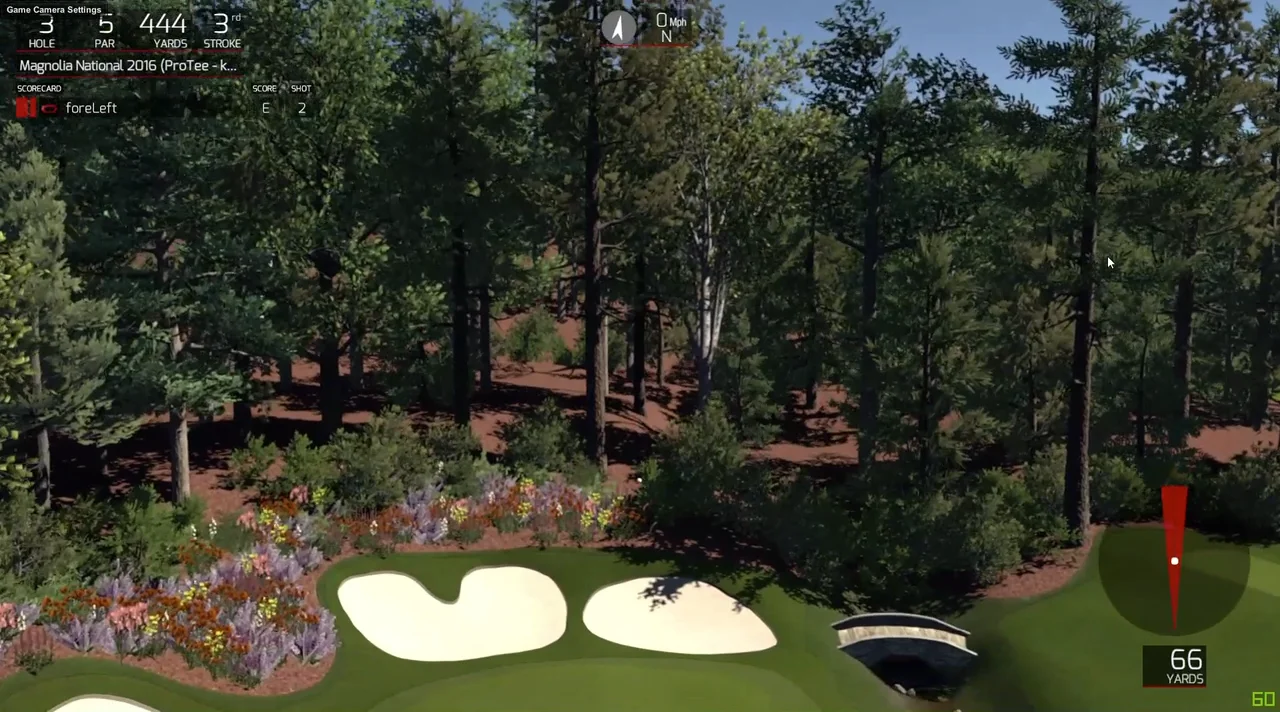
    • Rcush88, Brettster - Here's a video of me playing Magnolia corner using SkyTrak on TGC. Apologize for the delay between shots - still getting used to figuring out the lines I want to take in sim play.

      I converted the video from 1080p to 720p before uploading. The raw footage is much crisper.

      Playing Magnolia Corner using Skytrak on TGC

      Comment


      • ForeLeft
        ForeLeft commented
        Editing a comment
        Brettster - sorry don't have a webcam connected, which is needed for insert camera. The delay for me was really very minimal. I think max 3 seconds, maybe even less. I would hit and look up and within a second or see the ball tracking. I really didn't notice it at all.

        I will see if I can just record the audio of me hitting the ball, which may give an idea of when shot was hit.

      • Rcush88
        Rcush88 commented
        Editing a comment
        Hey Foreleft, what kind of computer do you run that on?

      • ForeLeft
        ForeLeft commented
        Editing a comment
        Guest, I had recently purchased the HP Envy 750se via slick deals. Here is the config:


        HP ENVY 750se Desktop PC

        •6th Generation Intel(R) Core(TM) i7-6700K processor quad-core [4.0GHz, 8MB Shared Cache]
        •6GB Nvidia GeForce GTX 980Ti [DL DVI-I, HDMI, DP, DP, DP]
        •16GB DDR4-2133 DIMM (2x8GB) RAM
        •256GB 3D SSD
        •1TB 7200 RPM SATA 6G 3.5 2nd HDD
        •500W Power supply
        •7-in-1 Media Card Reader, 4 USB Ports (Top), Audio [Top 2USB2.0, 2USB3.0]
        •Integrated Sound
        •Blu-ray Writer and SuperMulti DVD burner
        •Windows 10 Pro 64-bit OS
        •HP Wireless 802.11 a/b/g/n/ac 1x1 with Bluetooth M.2 NIC (Stone Peak 1)

        Edit: I am able to run 1920 x 1280 of High at 60 fps. Though I plan to change that as I project 4:3. So my projector is doing some conversion. Have to play around with it.
        Last edited by ForeLeft; 02-27-2016, 06:04 PM.

    • Does the club selection on the top right of the screen have an impact on the shot? eg. if I hit 2 identical shots with my driver, one with driver selected, the other with a pitching wedge selected, will the results be the same or different due to the club selection?

      Comment


      • Originally posted by loll_l View Post
        Does the club selection on the top right of the screen have an impact on the shot? eg. if I hit 2 identical shots with my driver, one with driver selected, the other with a pitching wedge selected, will the results be the same or different due to the club selection?
        Club selection has no impact on the shot. Only time it's important is when you want to putt. Putter needs to be selected. Putter is automatically selected when on the green but if your in the fringe wanting to putt you need to switch to putter. The selected club will soon be used to giv feedback on your club distances, spin etc. as those numbers will be saved in the cloud and you will be able to get the club averages etc. Beta testers are testing this now but things are slow coming due to ST launch, various other TGC integration and version 3.0 work etc.
        Stay tuned!

        Comment


        • Originally posted by ForeLeft View Post
          Rcush88, Brettster - Here's a video of me playing Magnolia corner using SkyTrak on TGC. Apologize for the delay between shots - still getting used to figuring out the lines I want to take in sim play.

          I converted the video from 1080p to 720p before uploading. The raw footage is much crisper.

          https://vimeo.com/156763806
          How did you get the frame rate to show in the bottom right?

          Comment


          • ForeLeft
            ForeLeft commented
            Editing a comment
            I was playing around with ShadowPlay for recording. I couldn't get it to record, but I think it had a setting in there to show frame rate. I ended up recording using Windows 10 Game bar, which worked fine.
        Working...
        X