
I heard there was a problem with the authorization key For GSA and someone mentioned the same thing with ProTee. Might be the same for Skytrak. I also read should be fixed this week. Fingers crossed.
-
-
Well, perhaps SkyTrak does not officially support the Connect Demo but somehow my SkyTrak device is now authorized! .
.
Just played 18 holes on the demo course. Love it!!!. Hopeful that SkyTrak will start to sell it. It would make a nice Xmas gift to myself.Comment
-
Ok Jerome so how about a video of what it looks like playing it? Or are you saying you can only play 18 holes and that's it?Comment
-
Skytrack shows up as one of the devices under the Simulator selection in the latest version (1.2.1.5). So yeah, it looks like E6 has the Skytrak included in their latest demo release. Now all I want is a mid-short throw 4k HDR projector and a holodeck and I'll be happy.Originally posted by frankiepap39 View PostCourses Created:
Cresent Hill KY (L)
Cherokee Park KY (L) 9
Seneca GC KY (L) 18
Charlie Vettiner KY (L)Comment
-
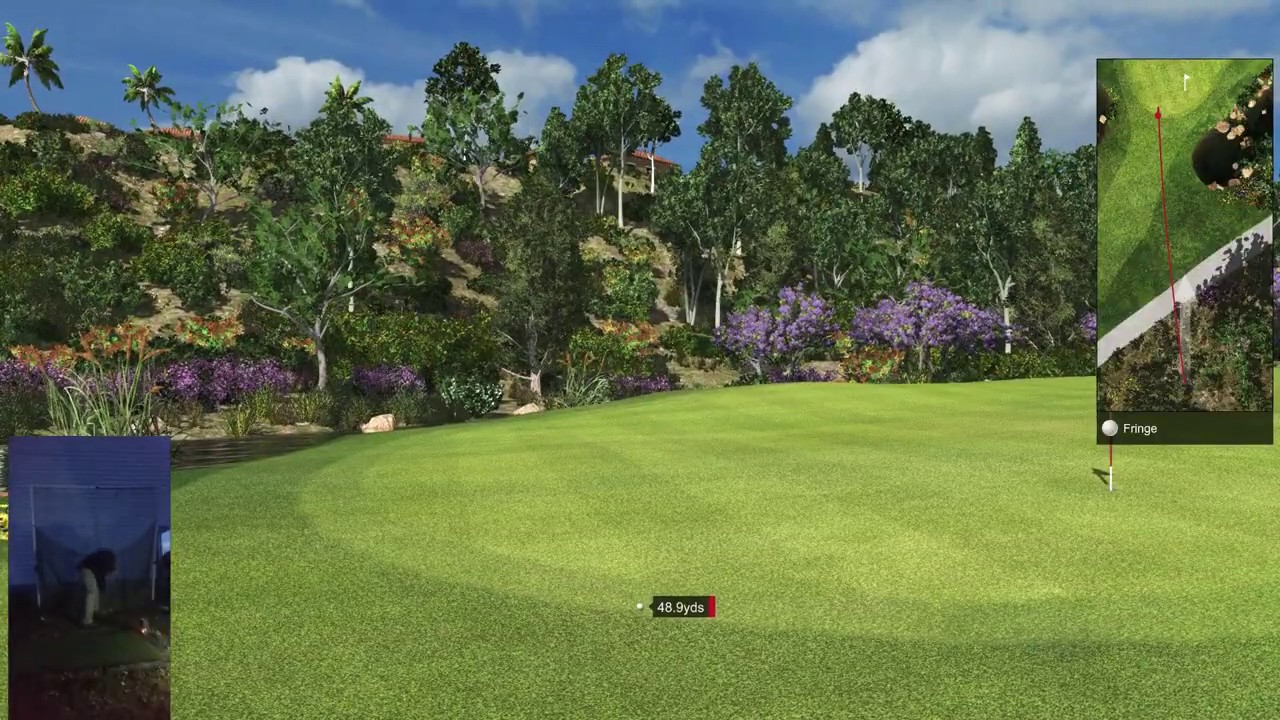
Video captured at 1080P to keep size down. System is a Hades Canyon NUC. 1080P and 1440P run at 60 FPS. 4K sometimes drops to 30FPS
 Last edited by Jerome; 11-12-2019, 02:08 AM.
Comment
-
Was wondering if anyone was able to use this on a Windows 7 64 bit machine as their site says Windows 10 64-bit (Required)Comment
-
Jerome - thank you! That is impressive... I wish E6 was not so expensive to play with annual fees... They should offer some type of Demo Pass, $50/season for all you can play, just to get sim golfers to try it out.
I also wonder about the E6 Connect, as it sounds great too, does anyone have it, and do they like the new version?
Thanks,
-BrettComment
-
I have it. E6 Connect version is great. Both with graphics and sim play like being on the course.Comment
-
I've been playing it and its really nice. I am getting some unusually high spin though off my SkyTrak setup though. I'm pitching in full swing 9 irons and getting a good 3-5 yards or spin back on a bunch of my shots. I can tell you in real life, I've maybe seen that a handful of times. Makes you certainly feel like you are hitting them well. Oh and putting off of a fiberbuilt mat... oh god... Horrible... I don't think that is the simulator's fault. The ball just skips and jumps and it shows the ball going way off line a bunch.Comment
-
I putt of fiberbuilt matt have no problemComment
-
How are other SkyTrak users able to connect?
I'm at the same point Jerome was at before he was able to play. Downloaded the demo version successfully, i'm able to select Skytrak in the settings options and it sees my device, but shows "device not authorized, contact skytrak support". Contacted skytrak and they say it's not available yet. (yes, I have game improvement package through skytrak)
Can even open and play (see) the course, but shows that my skytrak isn't authorized.Comment
-
I have filed the online request for the demo, "SkyTrak (beta)," several times, to receive an email with a link, with no response.Comment
-
Dan McWhirter
Dan, check your junk mail folder. I've sent in that request several times and received this link https://beta.e6golf.com/signup if that does not work for you there are a few others you can look at include this one: https://e6golf.com/e6-connect/demo/ and then there is this which also looks great https://beta.e6golf.com/login and take a look at this page https://e6golf.com/ to see a preview of it before you download I see now that you are looking for SkyTrak Beta, well maybe you can find it in these links, or ask them at E6, looks like you already own E6 - are you happy with it, I wonder how much better E6 Connect is - as it looks fantastic.
I setup a trial account, and signed in, but have not yet connected my Sim (still finishing my build), and it looks like it will track every shot you take in the simulator which you can send to a coach or trainer for further analysis, great stuff.
Good luck, let us know what you find and how it works for you with SkyTrak...
Thanks,
-BrettComment
-
Thank you Brett! I've had e6 for three years, expired end of August. I tried them all as they became available in 2016. Stuck with e6. -
The E6 demo will not work without the Protee E6 connect interface.
Unfortunately there is no demo interface version to use the demo.
You can request from Trugolf the flight optimisation demo but you can only use the mouse to fire shots and navigate round the software.
-
-
The whole experience of getting Connect Demo to work on SkyTrak was like voodoo.- Download link was not sent after first request.
- Download link was sent after second request.
- SkyTrak did not appear in simulators.
- Email support with TruGolf suggested to call SkyTrak(I didn't at that time).
- Launched Connect later and SkyTrak in the simulators list but device not authorized.
- Had online chat with SkyTrak support. SkyTrak support says: Connect not supported.
- Later, downloaded updated version of Connect from TruGolf just to see changes.
- Magically SkyTrak device was authorized.
I don't think the partnership between TruGolf and SkyTrak is solid. Perhaps not enough people use e6 with SkyTrak to motivate SkyTrak to rush to support the new product. AND/OR SkyTrak is afraid Connect will cut into the TGC sales(more profitable of SkyTrak).Last edited by Jerome; 11-27-2019, 01:30 PM.Comment
-
I had almost 0 issues getting the demo to work on SkyTrak. The hardest part was originally getting the Skytrak to be recognized by the software, but really that only took about 5 or so minutes of patience. I think it looks amazing, however the spin dynamics are so wildly inaccurate on greens and out of sand, that if I was in the market to spend this kind of money, it would be a massive detractor for me.


Comment