Announcement

Collapse
No announcement yet.

automatic swing recording and slow motion playback with kinovea

Collapse
X
 
  • Filter
  • Time
  • Show
Clear All
new posts

  • automatic swing recording and slow motion playback with kinovea

    I figured I should start a new topic because the other thread has gotten a little long and confusing. Primarily I don't want anyone to think I am using ps3eye cameras for a dual recording setup. i've had a couple of people contact me after purchasing two ps3eyes cameras, asking how to get them working with the dual recording script. while you can get it to work, it is not easy to do. If you are looking to do a 2 camera setup, skip the ps3eye cameras. I would recommend the OV2710 usb cameras from eBay that will do 100fps at 640x480 (does not do 120fps as advertised). There are many lens options and what works for you will depend on how far away you will be placing the cameras. These run at around $40-50.

    If you are looking for a very cheap 1 camera setup the ps3eye is great. Picture quality and frame rate aren't the best and getting 2 to work in kinovea is a pain but they cost less than $10.

    you can run one ps3eye and one OV2710 camera together. i did this for a few months. in this video the ps3eye cam is on the right and the OV2710 is on the left. you can see that the ps3eye is grainy and at 60fps, it is not great but does the job. in addition to a sharper picture and increased fps, another reason I ended up getting two OV2710 cameras is because with one video at 60fps and one at 100fps I couldn't sync the videos up.


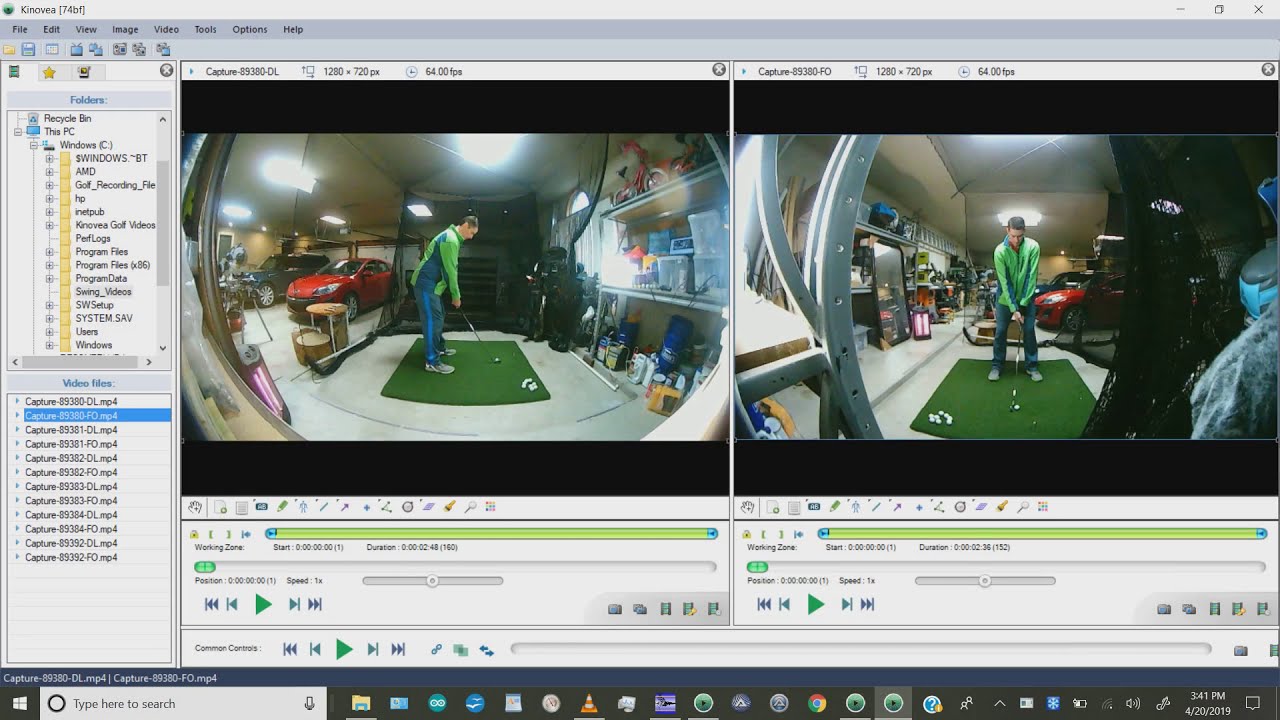
    Here is what it looks like using 2 of the OV2710 cameras.


    the way it all works is based around kinovea's live delay feature. if you set the delay to 3 seconds, whatever the cameras see in real time shows up on screen 3 seconds later. if you only want to see your swing once, in real time, you could just run kinovea on a second monitor and set the delay to suit your needs. my autoit script automates the recording and playback process. the sound of impact triggers the script which starts and stops the recordings in kinovea, then opens the recordings in vlc. this means that two 6-7mb files are created every time you hit a ball, so you do need to watch your disk space. it works great for me and a few others here on this forum. before I did this, I took a lot of videos with my phone and while the video quality on any modern phone or tablet is far superior to the OV2710 cameras, it is so much more convenient this way.

    what you need to run a two camera setup is the following:
    a good computer (if it can run tgc smoothly, you should be ok)
    2 cameras (either 1 ps3eye and 1 OV2710 or 2 OV2710's)
    active usb extension cable
    audiozonetrigger https://www.zonetrigger.com/sound-detection/
    microphone
    kinovea version 0.8.15 (other versions will not work)
    vlc media player
    my autoit script

    the software is free except for audiozone trigger with costs $25. for hardware costs, you have 2 cameras at $50 each, a microphone for $10, and a usb active extension for $10, so all in $145.
    Attached Files
    Last edited by inorkuo; 12-11-2017, 06:49 PM.

  • #76
    Would this camera work ok? If I’m looking to set it up in my basement with moderate lighting will it work ok or do you really need a bright room? I guess I wasn’t sure what adequate light would be.

    SVPRO 1080p Full Hd USB Camera Module,2 Megapixel Free Driver High Speed CMOS OV2710 Wide Angle Mini CCTV USB Web Camera with UVC for Android Linux Windows MAC OS(2.1mm) https://www.amazon.com/dp/B07CSVW9QY..._ybisCbGSYYA1C

    Comment


    • #77
      I can only get 25 FPS with the OV2710 camera in any resolution. It says 120 fps but kinovea reports only receiving 25? Confirm playback is faster than PS3 at 75 FPS.

      Comment


      • inorkuo
        inorkuo commented
        Editing a comment
        if you adjusted exposure, it can cause a drop in fps. leave exposure set to auto and adjust brightness, contrast, and gain if the picture isn't bright enough.

    • #78
      peesh: That svpro seems to be the same as the popular ELP. If it runs at 120 fps but probably only puts out 100 fps I wouldn't recomment it without being modified to match the actual frame rate. Otherwise the playback speed will be wrong (too fast) and the video will not be as smooth as it should be. Most people buy the ELP and ELP has been happy to do the modification when requested.

      Supra: If you only get 25 fps that means your lighting is too dim and the fps is being limited by the exposure time required for proper exposure. You can manually increase the shutter speed or add a lot more light. If you shorten the shutter time then you will need to increase the gain for a bright enough image. It will become grainy so there's a limit to how well that works.

      I wrote a primer covering these concepts a few years back. It might be worth a read if you haven't already. I've just updated the thread to cover the Kayeton GLOBAL shutter 1280x720p@120fps camera ($85). The primer thread is here: https://golfsimulatorforum.com/forum...d-a-golf-swing

      Comment


      • Supraracer
        Supraracer commented
        Editing a comment
        Thank's Faulty!

    • #79
      any one have issues with order of starting files or things just doing nothing? Sometimes everything works for me, and sometimes nothing works (in that nothing happens). I have a log file in Audio Zone Trigger, so I know it is triggering. I'm wondering if it is a start-up issue or not the right program having focus. Most times I start up kinovea, set up my two cams, and then start up Audio Zone Trigger, and then run vlc. I always get images in kinovea, but it seems that sometimes that script just never does anything.

      Comment


      • #80

        Hello inorkuo, would it be possible that you here make recording_dual_exp.au3 available for download? Thanks in advance.

        Comment


      • #81
        Hi all, I am well on the way to finishing my simulator and am setting up the dual camera system as designed by inorkuo (thanks dude, amazing work!) To save a few bucks I had setup my sim using a 5 year old, basic Lenova i5 laptop. This works fine for the SkyTrak software and I can get one camera to record, but two cameras just pegs the CPU and seems to overwhelm it. So now I have decided to build a PC for the sim.

        I can't seem to find the answer to this question anywhere: Since Kinovea is processing 2D video am I better off putting money into a better CPU or a higher end graphics card? Another way of asking this is does Kinovea benefit at all from a better graphics card or is the processing done by the CPU?

        This forum has been an amazing resource - thanks to everyone for their time and advice!

        Comment


        • inorkuo
          inorkuo commented
          Editing a comment
          if you are upgrading computers i would do a desktop with an i7. you might as well get a better graphics card too since most sim software options are going to require something decent.

        • NovaGolfer
          NovaGolfer commented
          Editing a comment
          Thanks - I am ordering an i7. I checked with Kinovea and they do not currently support graphics cards so all of the work is done by the CPU.

      • #82


        Has this been addressed anywhere?

        Comment


        • inorkuo
          inorkuo commented
          Editing a comment
          create a recording manually so that there is a "-" in the file name

        • ATROVARIOUS
          ATROVARIOUS commented
          Editing a comment
          I'll give it a shot.

      • #83


        How about this issue?

        Comment


        • inorkuo
          inorkuo commented
          Editing a comment
          does D:\Swing_Videos\Capture 20 - 207 - 201.mp4 exist in your file system? i'm would guess the video save directory and/or the file format in kinovea isn't matching what the script is looking for.

        • ATROVARIOUS
          ATROVARIOUS commented
          Editing a comment
          No, the file doesn't even exist. It started after I changed the file location and then changed the location in both Kinovea and Audio Zone trigger. I also deleted all the swing videos. I'm pretty sure everything matches. The files numbers should be in single digits at this point. I'll play with it some more and then let you know. Do you set up the properties of the mp4 file to open with VCL?

      • #84
        Inorkuo, I thought you might be interested in posts 14-19 on the Kinovea 8.27 forum: https://www.kinovea.org/en/forum/viewtopic.php?id=886

        I rewrote your AutoIt script for use with OV4689 cameras. Since 8.15 can't allocate enough memory to delay two OV4689 cameras, I tried it in 8.27. With the existing script, all I could get was 32fps at 1280x720 with "Display Framerate" set to 100fps and verified with a stopwatch in the recording. But by using two Kinovea instances, you can overcome some of the limitations of the new delay mode. 2 instance mode allows you to double the framerate from 32fps to 64fps @ 1280x720 because each instance gets its own processor. At that point, framerate appears to be processor/thread limited. I'll have to try the script with a faster PC when I get a chance - might get a few more fps.

        I prefer the higher resolution and brightness of the 64 fps I get on the OV4689s, but the ~95fps OV2710s may work better for some people.

        The camera manufacturer was able to provide me with a firmware that fixes the frame rate so that there are no drops because of low light. Although upgrading lighting also made a huge improvement.

        Thanks again for all of your work on this!

        Comment


        • stell123
          stell123 commented
          Editing a comment
          Waheeden - any possibility you can post your scripts? I'd like to take a look.

        • Waheeden
          Waheeden commented
          Editing a comment
          stell123, check post #89 below.

      • #85
        This is a great topic. I'm going to try this out. Very limited on FO so hopefully will work out. Thanks Inorkuo

        Comment


        • #86
          Is this the camera here
          Attached Files

          Comment


          • #87
            I have been trying to get this lined out for a couple of weeks. Obviously NOT a computer guy. I have read all the post, have it set up what seems properly. When triggered Kinovia does not record, my computer is asking what to open the file with. Any help would be much appreciated.

            Comment


            • #88
              I've had a few requests for my dual instance Kinovea AutoIt script. Since my last post, I also replaced VLC playback with a third instance of Kinovea. This allows the automatic slow motion replay to be paused at any time to use Kinovea's analysis tools. Once analysis is complete, the script automatically resumes.

              You can see the script in action here: https://youtu.be/76bIdMv-GPY

              The cameras are two Kayeton OV4689 USB cameras with 180deg fisheye lenses (not much room around the hitting cage) in 1280x720 resolution at 64fps (most I could get in v8.27 Kinovea Delay mode). Even at 64fps, it works very well.

              There is some additional technical discussion here: https://www.kinovea.org/en/forum/vie...php?id=886&p=2

              Based on the original AutoIt script by Inorkuo which uses two OV2710 cameras in 640x480 at 100fps, 1 instance of Kinovea v8.15, and 2 VLC windows for playback.

              Here is the script in both au3 and exe formats: 3_Instance_Kinovea_Swing_Recording_Files.zip
               

              Comment


              • Waheeden
                Waheeden commented
                Editing a comment
                Oh, and the arrow keys move the delay 1 frame at a time. It is painful trying to do it with just the slider.

              • zip
                zip commented
                Editing a comment
                Where do you purchase the OV4689? The one I found on amazon doesn’t seem to have a case. Want to make sure I’m buying the right cameras. Thanks!

              • zooliu
                zooliu commented
                Editing a comment
                Just saw this and was excited to try it out as i'd love to use kinovea to analyze recordings w/the line overlays instead of hacks w/VLC. So i downloaded the latest kinovea beta and couldn't get it to see my cameras (PS3eye and OV2710). Am I missing something or do i need to have OV4689 cams in place to leverage your workflow? thanks!

            • #89
              Here is the fixed framerate firmware and installation instructions for the Kayeton OV4689 cameras that record 1920X1080 MJPEG 60fps,1280X720 MJPEG 120fps, 640X360 MJPEG 330fps.

              This will prevent dropped frames due to low light etc. It will send the full 100 fps to Kinovea - Although the delay buffer in Kinovea 8.27 will only accept 64 of the 100fps when running the AutoIt script with microphone trigger.

              Comment


              • #90
                Does anybody know if the usb cameras that are sold as protees v and h cam Could be repurposed and used as swing cameras if you switched to a foresight set up?

                Comment

                Working...
                X